

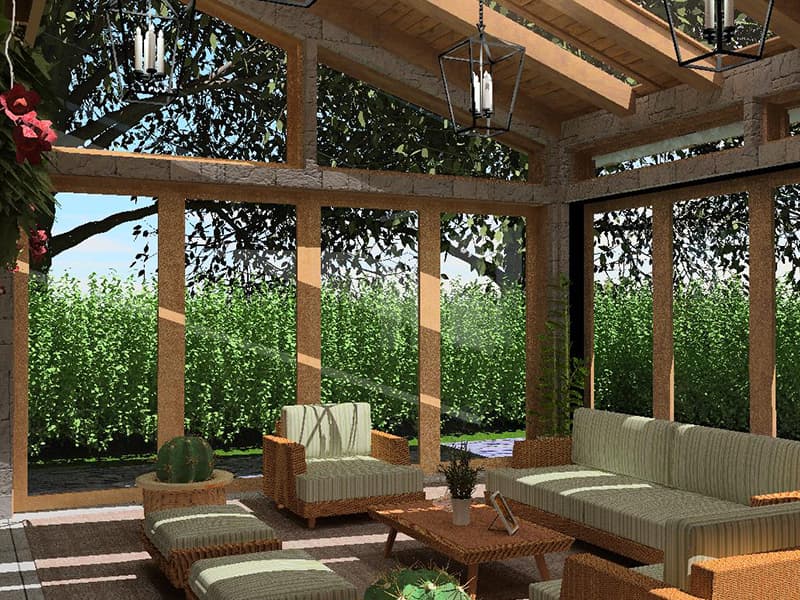
 FIG·01
For homeowners and contractors mapping out a deck, patio, or full landscape renovation this summer, ArchiMaster 3D Landscape & Deck delivers the most complete, photoreal outdoor design experience available in a Punch! Home Design alternative. It combines a true-to-scale plant and hardscape library with real-time sun-path simulation, letting you preview shade, materials, and planting schemes before you spend a dollar. While Punch! Software has long been a budget-friendly entry point for DIY home design, its outdoor tools often feel dated and lack the visual fidelity that today’s homeowners expect when planning a space they’ll grill, lounge, and entertain in. This article compares the two platforms head-to-head, focusing on the specific features that matter for summer outdoor living projects: deck framing, terrain modeling, sun studies, and photorealistic visualization.
- Punch! Home Design includes landscape tools but its plant libraries and rendering lack the photorealism needed to fully visualize a summer patio at dusk.
- ArchiMaster 3D’s Landscape & Deck edition provides a one-time purchase license starting at $79.99, with no recurring fees, and includes terrain grading, a hardscape library, and accurate shadow studies.
- Built-in sun-path simulation lets you preview exactly where shade will fall on your deck at any hour, date, and location, a must for designing comfortable outdoor living spaces.
- A shared engine across ArchiMaster 3D editions means you can start with the landscape-focused tool and later upgrade to full interior design without learning new software.
- The software’s true-to-scale plant encyclopedia, filtered by climate zone and mature size, ensures your summer plantings won’t outgrow their bed.
Why Outdoor Living Projects Demand Dedicated Design Tools
Designing a deck, patio, or landscape is not the same as arranging a living room. Sloped terrain can turn a simple deck into a multi-level engineering challenge. The sun’s arc in July is nothing like its path in December; a pergola that looks perfect at noon might plunge the dining area into full shade by 6 p.m. And unlike interior software, outdoor design must account for plant growth, hardscape drainage, and material weathering. The 2026 Houzz & Home Study confirms that outdoor renovations remain a top priority, yet many homeowners still use general-purpose home design software that flattens contours and ignores the sun. ArchiMaster 3D addresses these gaps with a purpose-built landscape edition that lets you sculpt terrain by hand. Its sun-study tool, linked to your project’s geographic location, shows exactly where light and shadow will land during your planned summer gatherings.

Punch! Home Design: What It Gets Right, Where It Falls Short
Punch! Software has offered home and landscape design tools for decades. Its Landscape & Deck Design product includes basic terrain shaping, a selection of plants and hardscape objects, and a deck wizard. However, the rendering engine still relies on older technology that produces flat, illustration-like results rather than the photo-quality visuals homeowners now expect. Its plant library is functional but limited in regional specificity, and it doesn’t offer the same real-time sun-path analysis that makes ArchiMaster 3D’s outdoor previews so powerful. Many Punch! users also cite a productivity-killing subscription model, where adding certain object libraries or upgrading to a newer version incurs recurring costs. In contrast, ArchiMaster 3D Landscape & Deck is a one-time purchase that includes the full library and all future updates for that major version. Our deep dive into the best landscape design software of 2026 shows why ArchiMaster 3D consistently ranks above Punch! for serious outdoor projects.
ArchiMaster 3D Landscape & Deck: A Deeper Look
ArchiMaster 3D Landscape & Deck is built on the same photorealistic engine as the full Ultimate Home Design suite. You open a project, set your geographic location, and start modeling the existing site. The terrain tools let you shape the ground directly with slopes, plateaus, hills and berms. Then you drag real-world scaled objects from a catalog of true-to-scale plants, trees, shrubs, and hardscape items: Ipe decking, bluestone pavers, cedar pergolas, outdoor kitchen components, and more. Each material is physically based, meaning it reflects light and casts shadows as it would in real life. The integrated sun-path slider adjusts date and time to show exactly how the sun moves across your design, a critical feature for positioning dining areas, fire pits, and shade structures for peak summer comfort. You can also generate 360-degree panoramas and walkthrough videos that bring the space to life for family or clients. Learn more about what 3D home design software can do.

5 Outdoor Design Features That Separate Serious Software from Amateur Tools
- Real terrain grading. ArchiMaster 3D lets you sculpt landforms directly, so your deck sits correctly on a sloping lot, not on a flat digital plane.
- Location-linked sun-path simulation. Unlike simple light-direction dials, ArchiMaster 3D ties your project to real-world coordinates, showing accurate shadows at 4:32 p.m. on July 15th.
- Mature plant sizing. The plant library includes expected height and spread at maturity, preventing the common mistake of planting a blue spruce where it will eventually swallow the porch.
- Deck framing and materials. You can design deck substructure, choose from 30+ decking materials with realistic wood grain and weathering, and generate a cut list for accurate material ordering.
- One-click photorealistic rendering. With a single click, the software produces a sunlit, shadowed, and textured image of your outdoor space that looks like a photograph, not a cartoon.
“The right software does more than drop a deck onto a screen; it lets you experience your shade-cast pergola at sunset before a single board is cut.”
Which ArchiMaster 3D Edition Suits Your Summer Project?
ArchiMaster 3D comes in several editions, all sharing the same core engine. For a standalone outdoor overhaul, the Landscape & Deck edition (starting at $79.99) is purpose-built for terrain, hardscape, and planting design. If you also want to remodel the kitchen that opens onto the deck, the Ultimate Home Design edition ($99.99) adds complete interior design tools, including the Kitchen & Bath workspace, in one license. Both are one-time purchases, not subscriptions, and include a free trial so you can verify the sun-study and rendering quality on your own project before paying. For pros, the Expert edition unlocks higher-resolution exports and client presentation features. Compare editions and see current prices on the pricing page, or explore all options on the products page.
- Is Punch! Home Design suitable for serious landscape design?
- Punch! includes basic terrain and plant tools, but for a summer outdoor project with sloped sites, shade studies, and detailed material selection, ArchiMaster 3D’s photoreal engine and smart plant filtering produce noticeably more accurate and client-ready visualizations.
- Can I design a deck and landscape in the same ArchiMaster 3D project?
- Yes. All outdoor elements live in the same model, so you can see exactly how your deck’s railing interacts with the garden bed and how the pergola’s shadow falls across the patio tiles at your chosen time of day.
- Does ArchiMaster 3D provide a hardscape cost estimate?
- While it doesn’t auto-calculate material costs (prices vary regionally), the deck framing tool generates precise dimension lists, and you can assign unit costs to plants and pavers in the included spreadsheet-style estimator.
- Is there a free version of ArchiMaster 3D I can try before switching from Punch!?
- A fully functional free trial is available. You can download it, import a reference image of your house, and design your entire outdoor space to see how the sun simulation and rendering look before committing to purchase.
Ready to design the outdoor living space you'll enjoy all summer? Download the free trial and start building your deck, patio, and landscape today.
Download Free TrialReady to design with confidence?
See which edition fits the space you’re designing.

