 FIG·01
Floor plan maker software lets you draw a room or a whole house to scale, furnish it and, in most tools, walk through it in 3D. These are the strongest picks for each kind of project in 2026.
The best floor plan maker software by need (short answer)
- Best all-rounder: RoomSketcher. Free tier, paid plans from $49 a year (Deskflex), on web, Mac, Windows and mobile.
- Free, in a browser: Floorplanner. Its Basic plan is free and includes the full 3D model library.
- Free with no paid tier at all: Sweet Home 3D, which is open source.
- Beginner home DIY: Planner 5D. For a quick, simple sketch: Canva.
- Technical drawings: AutoCAD for precise 2D drafting, Archicad for BIM-driven architectural plans.
- A whole home on a Windows PC: ArchiMaster 3D, from a scanned plan to a photoreal render made on your own computer. Windows only (64-bit Windows 11, 10, 8 or 7), no free version, 10-day free trial.
The checks below narrow the list further, followed by the 12 tools in detail and a test plan you can draw in any of them.
What is floor plan maker software?
A floor plan maker is a program that lets you draw rooms, walls, doors and windows to scale, from above, as a 2D plan. Most also build a 3D model from that plan, so you can see ceiling heights, furniture and finishes before anything is bought or built.
The tools fall into three rough groups. Browser and mobile apps (Floorplanner, Planner 5D, Canva) are quick to start and made for layouts. Drafting and architecture programs (AutoCAD, Archicad) produce technical drawings for builders. Home design programs sit between them, covering a whole house plus 3D renders without asking you to learn a drafting suite.
What to check before you pick a floor plan maker
Where does it run: browser, Mac or Windows?
Browser tools run in a web browser, so there is nothing to install and the operating system matters less. Desktop programs install on one kind of computer, and the vendor's system list tells you which.
If you work on a Mac, choose one of the web tools in the comparison below, or one that Deskflex lists with a Mac version, such as RoomSketcher, SketchUp or Sweet Home 3D.
Do you need 2D, 3D or a photoreal render?
A 2D plan is enough to test where the sofa and bed go. Deskflex notes that 2D plans are faster to create, easier to print and standard for real estate listings and construction drawings. A 3D model helps you judge room height and how one space flows into the next.
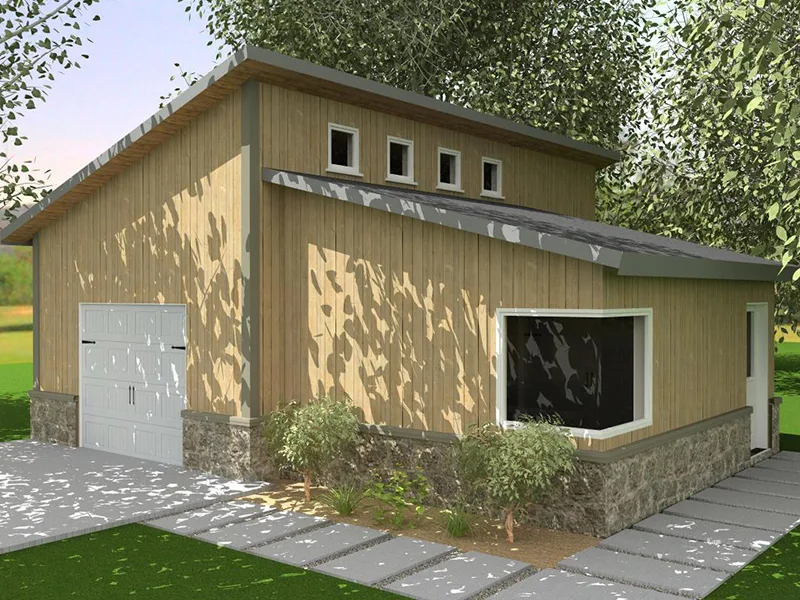
A photoreal render goes a step further and shows finishes, materials and light. Homestyler advertises 4K rendering, G2 ranks D5 Render best for real-time visualization of floor plans and interiors, and ArchiMaster 3D makes photorealistic renders and walkthrough tours locally on your PC.
Can it trace a scanned or sketched plan?
If you have a builder's plan, an old blueprint or a hand sketch, a tool that imports it as an image saves you redrawing every wall from scratch. You trace over the picture instead. ArchiMaster 3D imports scanned or sketched floor plans as images for exactly this.
Who do you need to share it with?
Deskflex puts it simply: if your design needs to feed a construction project, CAD compatibility matters, and "if you are showing options to executives, photorealistic 3D matters." Online tools such as Homestyler (real-time collaboration, cloud saving) and Edraw.AI (cloud access so team members can edit files) are built around sharing.
ArchiMaster 3D works the other way round. It runs offline and keeps the project file on your own drive. To show a partner or contractor, it produces renders and walkthrough tours, and the Expert edition adds working drawings with vector printing.
Free plan, trial or one-time licence?
There are three cost models. A free plan lets you keep working at no cost, within limits. A subscription charges monthly or yearly. A one-time licence is paid once.
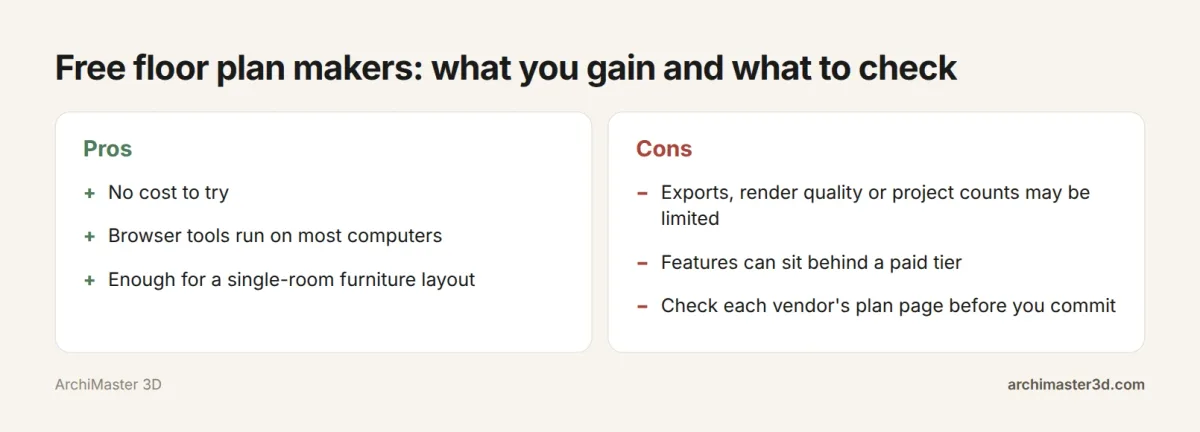
Deskflex lists where free and paid tiers usually differ: the number of projects, export quality and watermarking, furniture library size, 3D rendering quality, collaboration and support. Plan7Architect adds that free tools often need an upgrade to export and are not suited to full building projects, though it calls free software a good way to get started and test simple layouts. Before you draw a whole house in a free tool, read its plan page so you know what you can take away at the end.
ArchiMaster 3D is a one-time licence with no subscription; see the current prices on our site.
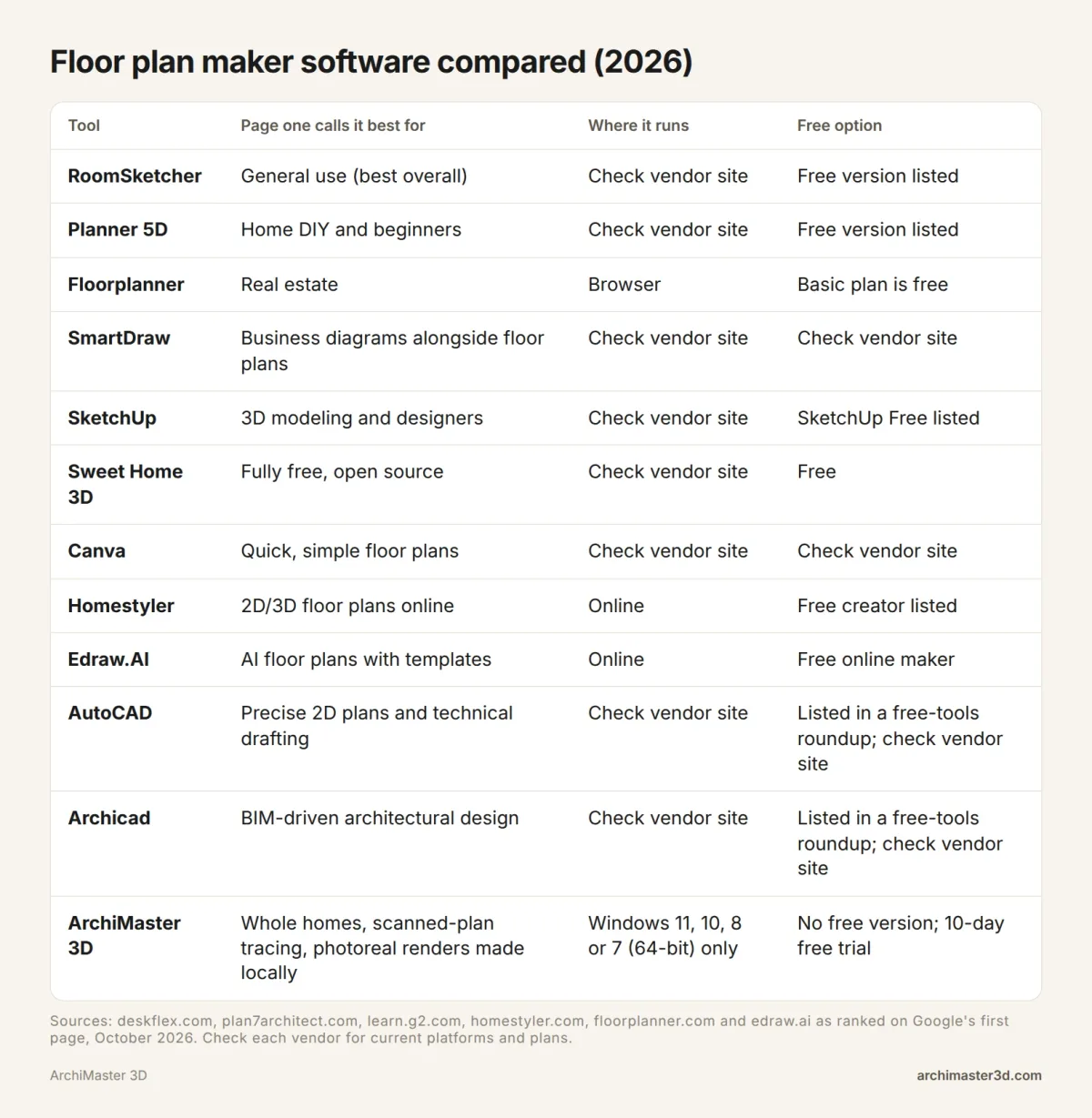
Floor plan maker software compared: 12 tools side by side
This is a desk comparison drawn from the guides that rank for this search (Deskflex, G2, Plan7Architect) and the tools' own pages, plus our product facts for ArchiMaster 3D. It is not a hands-on test. Prices change, and G2 notes its figures are subject to change, so confirm on each vendor's site before you buy.
| Tool | Platforms | Free option | Paid from | Source |
|---|---|---|---|---|
| RoomSketcher | Web, Mac, Windows, iOS, Android | Free tier | $49/year | Deskflex |
| Planner 5D | Web, iOS, Android | Free tier | $19.99/year | Deskflex |
| Floorplanner | Web only | Free Basic plan | $14/month | Deskflex |
| SmartDraw | Web, Windows, Mac | Trial only | $9.95/month | Deskflex |
| SketchUp | Web, Mac, Windows | Limited free web version | $349/year (Deskflex); $10.75/month/user (G2) | Deskflex, G2 |
| Sweet Home 3D | Mac, Windows, Linux, web | Fully free | Free | Deskflex |
| Canva | Web | Free tier | $14.99/month | Deskflex |
| Homestyler | Web, iOS, Android | Free | Paid tier available | Deskflex |
| Edraw.AI | Online | Free online maker | Check vendor | Edraw.AI |
| AutoCAD | Windows, Mac | 30-day trial | $1,470/year (G2); $245/month (Deskflex) | G2, Deskflex |
| Archicad | Not listed | 30-day trial | $78 + tax/month | G2 |
| ArchiMaster 3D | 64-bit Windows | 10-day trial | One-time licence | Our product facts |
Web tools suit Mac users and anyone who wants nothing installed. AutoCAD and Archicad suit people who need technical drawings for a builder. Home design tools suit homeowners who want to see the finished rooms before work starts.
1. RoomSketcher
Deskflex ranks RoomSketcher best overall. It praises the drag-and-drop interface as fast to learn, the 2D and 3D outputs as clean, and the Live 3D walkthrough as useful for clients who cannot read 2D plans. Plan7Architect calls it popular with beginners who want layouts quickly.
Watch for: Deskflex marks its AI features as limited. Cost: free tier, paid plans from $49 a year.
2. Planner 5D
Deskflex rates Planner 5D best for home DIY and beginners, with 2D, 3D and AI features all marked yes. Plan7Architect notes it is browser-based and easy to access without installation.
Watch for: Deskflex lists web, iOS and Android, but no Windows or Mac desktop version. Cost: free tier, paid from $19.99 a year. For a room-by-room comparison, see our best free room planner apps.
3. Floorplanner
Floorplanner is Deskflex's best browser-based tool for real estate, and Plan7Architect describes its online editor as straightforward. Its free Basic plan lets you create floor plans, use the full 3D model library and make SD exports, which Floorplanner itself pitches at casual use.
Watch for: web only, and free exports are standard definition. Cost: free Basic plan, paid from $14 a month.
4. SmartDraw
SmartDraw is Deskflex's pick for business diagrams alongside floor plans. It suits someone who already draws org charts or process maps and wants floor plans in the same place.
Watch for: 3D is marked limited, and there is no free tier, only a trial. Cost: from $9.95 a month.
5. SketchUp
SketchUp is Deskflex's pick for 3D modeling and designers, and Plan7Architect describes SketchUp Free as the web version of the well-known 3D modeling program. G2 users rate it 4.5 out of 5.
Watch for: Deskflex marks its 2D as limited. Cost: limited free web version; paid from $349 a year according to Deskflex, or $10.75 a month per user according to G2, which lists a 7-day trial. We compare the two for whole-house work in ArchiMaster 3D vs SketchUp.
6. Sweet Home 3D
Sweet Home 3D is completely free and open source, with 2D and 3D. Deskflex lists it for Mac, Windows, Linux and web, which makes it the obvious choice if you want no costs at all.
Watch for: Deskflex marks no AI features. Cost: free. If you plan to work from an old paper plan, see tracing scanned plans: ArchiMaster 3D vs Sweet Home 3D.
7. Canva
Deskflex picks Canva for quick, simple floor plans. It runs on the web with 2D drawing and AI features.
Watch for: Deskflex marks no 3D, so it is for a picture of the layout, not a model. Cost: free tier, paid plans from $14.99 a month (Deskflex).
8. Homestyler
Homestyler describes itself as a free online 3D design tool for floor plans and interiors, with real-time collaboration, 4K rendering and cloud saving. Plan7Architect says it focuses on interior layouts.
Watch for: Deskflex lists a paid tier, so check Homestyler's plan page for what that adds. Cost: free, with a paid tier available (Deskflex).
9. Edraw.AI
Edraw.AI offers a free online AI floor plan maker with ready-made templates. Its FAQ says it is designed for users of all skill levels.
Watch for: Edraw.AI supports more than 210 drawing types, from mind maps to flowcharts, so floor plans are one of many uses. Cost: Edraw.AI calls its online floor plan maker free.
10. AutoCAD
G2 ranks AutoCAD best for precise 2D floor plans and technical drafting, rated 4.4 out of 5. Reviewers there like its precision and say it is easy to collaborate because almost everyone in design or engineering understands AutoCAD files.
Watch for: G2 users cite a steep learning curve, high licensing costs and 3D tools that feel cumbersome, and Deskflex says AutoCAD takes weeks to learn well. Cost: 30-day trial, then $1,470 a year (G2). Our AutoCAD LT vs ArchiMaster 3D post walks through a 10 x 12 office plan in both.
11. Archicad
G2 ranks Archicad best for BIM-driven architectural floor plan design, rated 4.6 out of 5. BIM (building information modelling) means walls, doors and windows are objects in one model, and the drawings come from that model.
Watch for: it is built for architectural practice, not casual layouts. Cost: 30-day trial, then $78 plus tax a month (G2).
12. ArchiMaster 3D
ArchiMaster 3D is Windows desktop software purpose-built for homes. It imports scanned or sketched floor plans as images, furnishes them from true-to-scale libraries (200+ kitchen and bath cabinets, hundreds of lighting fixtures) and makes photorealistic renders, walkthrough tours and 3D animations locally on your PC, offline. Expert adds working drawings and schedules.
Watch for: Windows only, and no free version. Cost: one-time licence, 10-day free trial. See the full feature list.
Also on the shortlists: Deskflex includes Cedreo for professional home design (web, trial only, from $99 a month) and the Floor Plan Creator mobile app for on-site sketching (Android and iOS, free, paid from $9.99). G2 adds Enscape 3D for instant walkthroughs and ZWCAD for AutoCAD-style 2D drafting with a one-time licence.
A measured test plan: draw this in any floor plan maker before you buy
Reviews tell you how a tool feels to other people. A measured plan tells you how it behaves with your numbers. Draw this plan in every free plan and trial you try. It is a method for you to run, not a set of results from us.
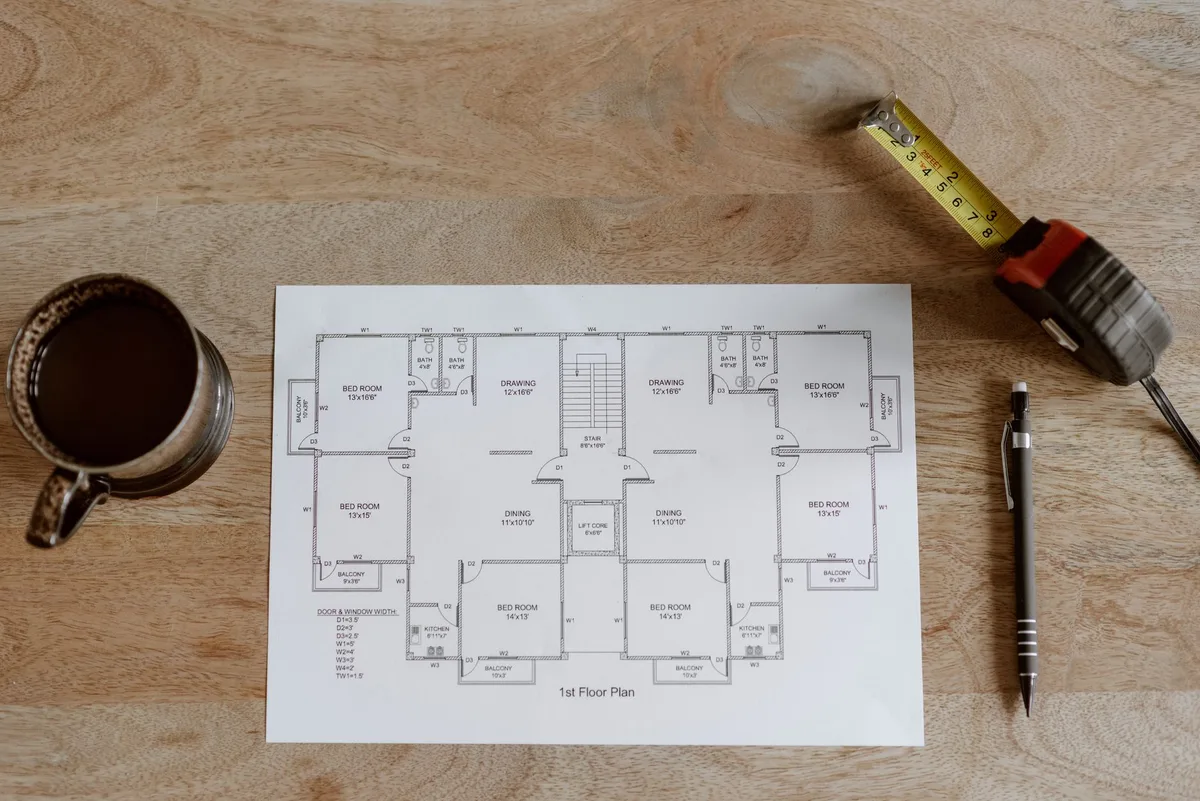
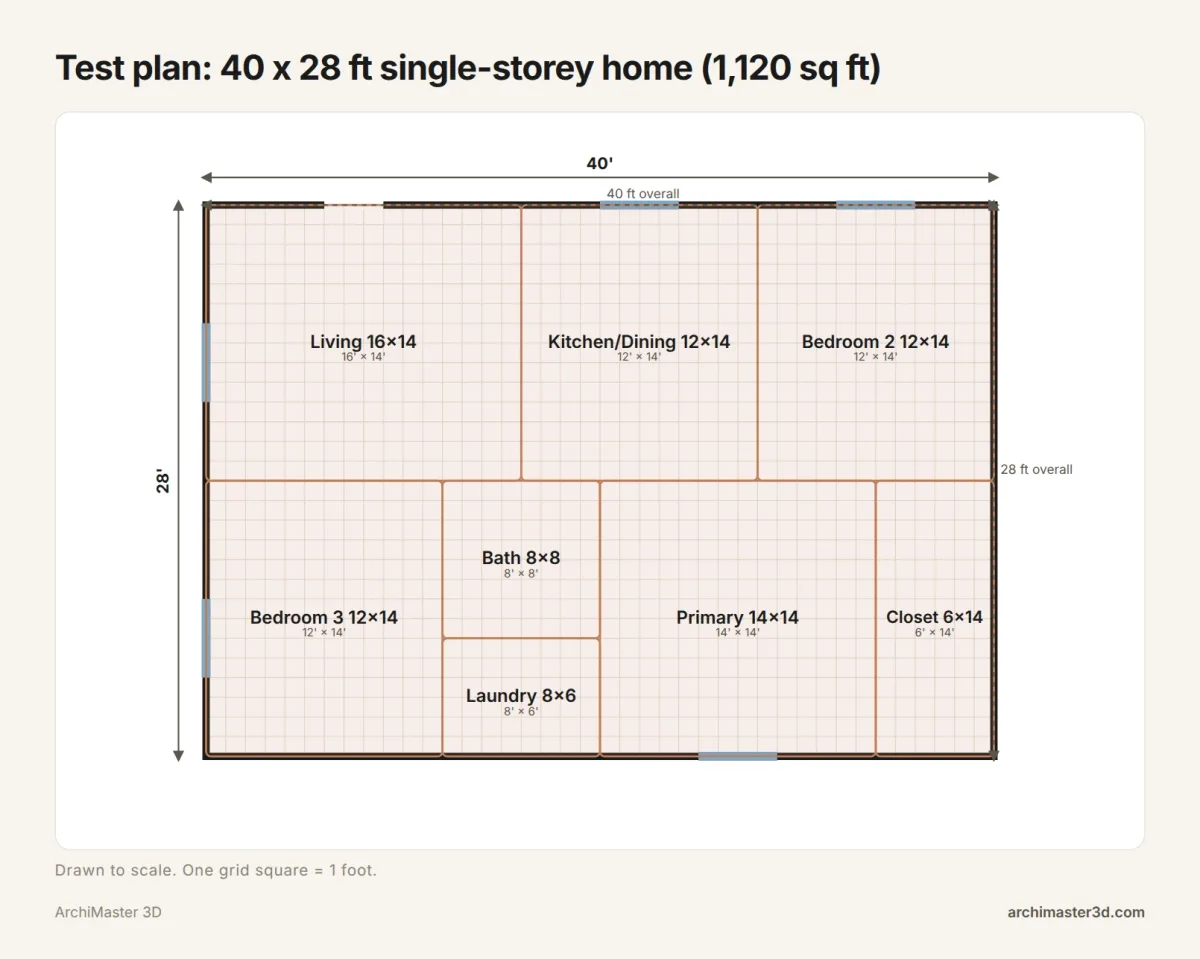
The plan: a 40 x 28 ft single-storey home
The outline is 40 ft by 28 ft, or 1,120 sq ft, split into eight spaces with no gaps.
| Space | Size (ft) | Area (sq ft) |
|---|---|---|
| Living room | 16 x 14 | 224 |
| Kitchen and dining | 12 x 14 | 168 |
| Bedroom 2 | 12 x 14 | 168 |
| Bedroom 3 | 12 x 14 | 168 |
| Bath | 8 x 8 | 64 |
| Laundry | 8 x 6 | 48 |
| Primary bedroom | 14 x 14 | 196 |
| Walk-in closet | 6 x 14 | 84 |
| Total | 40 x 28 | 1,120 |
The front door is 3 ft wide on the top wall, and there are five 4 ft windows: two more on the top wall, two on the left and one on the bottom.
Score 1: are the walls to scale?
Draw the outline first, then the interior walls. The overall dimensions should read 40 ft and 28 ft, and the room areas should add up to 1,120 sq ft. If they drift, look at how the tool handles wall thickness (measured to the wall centre or to its face) and how its snapping rounds your clicks.
Score 2: can it trace a scanned copy?
Print the plan above or photograph it on your phone. Import the image, set its scale, and trace walls over it. Then measure what you traced: a good tool lets you land on 40 x 28 ft without fighting the image.
Score 3: what do you get back?
Note what the tool gives you at the end: a 2D plan only, a 3D model, a photoreal render or walkthrough, or all of them. Then check whether you can print the plan or export it at a usable quality on the free plan or trial.
Scoring checklist: what to tick for each tool
Print one copy for each tool you try and fill it in as you draw the test plan.
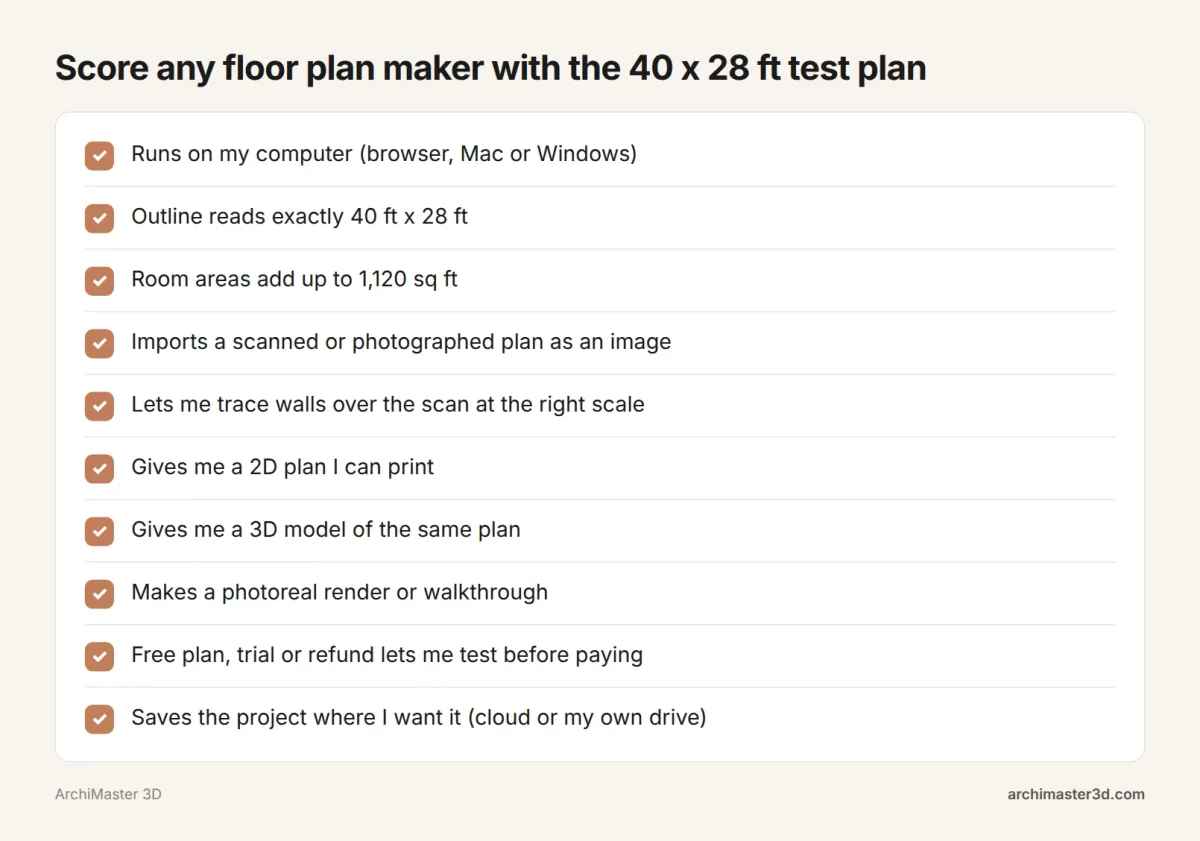
- The outline reads 40 ft by 28 ft.
- The eight room areas add up to 1,120 sq ft.
- You know whether walls measure to the centre or the face.
- The 3 ft door and five 4 ft windows place at their exact widths.
- A scanned or photographed plan imports and can be set to scale.
- Your traced outline lands on 40 x 28 ft.
- The tool gives you a 2D plan, a 3D model, a photoreal render or walkthrough (tick each).
- You can print or export at usable quality on the free plan or trial.
Run it during the free plan or trial, so a tool that fails costs you nothing but an afternoon.
Is there a free app to design a floor plan?
Yes, several. Which one suits you depends on whether you want something free for good or free to start.
- Sweet Home 3D: fully free and open source, with 2D and 3D.
- Floorplanner Basic: a free plan in the browser with the full 3D model library and SD exports.
- Homestyler: a free online 2D and 3D creator with cloud saving.
- Edraw.AI: a free online AI floor plan maker with templates.
- RoomSketcher, Planner 5D and SketchUp Free: free versions of paid tools, listed by Plan7Architect.
For what free tiers usually hold back, see the free plan, trial or one-time licence check above. ArchiMaster 3D offers a 10-day free trial and a 30-day money-back guarantee; compare its four editions on our products page.
What is the easiest home design software to use?
For a single room, the easiest tools are the light, browser-based ones. Deskflex names Planner 5D best for home DIY and beginners and Canva best for quick, simple floor plans, and Archivinci says Floorplanner, RoomSketcher and Planner 5D are ideal for quick layouts without CAD experience. On Reddit, one user calls 2D Dreamy Planner the most user-friendly by far.
Deskflex also gives a useful sense of time. Browser tools can produce a decent layout in an hour, mobile apps a passable sketch in 15 minutes, while AutoCAD and Revit take weeks to learn well.
Ease depends on the job, though. A one-room furniture layout is easiest in a simple tool. A whole house with a roof, stairs, kitchen and a 3D walkthrough needs more features, and so a little more learning. ArchiMaster 3D includes wizards for doors, windows, foundations, kitchens, bathrooms, decks and patios, and sheds. For a whole-house comparison, read House Plan Design Software 2026.
Does AutoCAD do floor plans?
Yes, AutoCAD does floor plans, and it is the standard for precise 2D drafting. G2 ranks it first for exactly that, and Archicad first for BIM-driven architectural floor plans. Both are built for professionals and priced accordingly, as the table above shows.
If you are a homeowner who wants drawings for a contractor without learning a drafting suite, ArchiMaster 3D Expert covers that ground at home scale. It builds BIM models with working drawings, SmartView elevations and sections, dimension styles, vector printing and window and door schedules. You can try it through the Expert edition trial.
What software do interior designers use?
None of the pages ranking for this search measures usage, so there is no sourced "most used" figure. What they do show is a consistent set of tools tied to design work, split by task:
- 3D modelling: SketchUp, Deskflex's pick for 3D modeling and designers, rated 4.5 out of 5 on G2.
- Drafting: AutoCAD, whose files G2 reviewers say almost everyone in design or engineering understands.
- Presentation renders: D5 Render, rated 4.8 out of 5 on G2 for real-time visualization of interiors (from $38 a month), and Enscape 3D for instant walkthroughs.
- Quick client layouts: RoomSketcher, which Deskflex lists for interior designers, plus Floorplanner and Planner 5D, which Archivinci recommends for layouts without CAD experience.
So the short answer from the rankings is SketchUp for modelling, AutoCAD for drafting and a renderer for presentation. If your interior work centres on kitchens and bathrooms, try the Kitchen & Bath edition of ArchiMaster 3D.
Can ChatGPT or AI draw floor plans?
A general chatbot like ChatGPT can suggest a room layout in words, list sizes for each room or produce a picture of a plan. It is not a scaled drafting tool, though, so a generated plan can look right while its walls do not add up. Check every dimension against your tape measure before you rely on it.
Dedicated AI floor plan tools do exist. Edraw.AI offers a free online AI floor plan maker with templates, and Deskflex marks AI features in Planner 5D, Canva and Homestyler.
Whichever tool makes the first draft, the 40 x 28 ft test plan above is a fast way to see whether it holds scale. If you are more interested in AI for the finished image than the plan, see our guide to AI rendering tools.
When do people search for floor plan maker software?
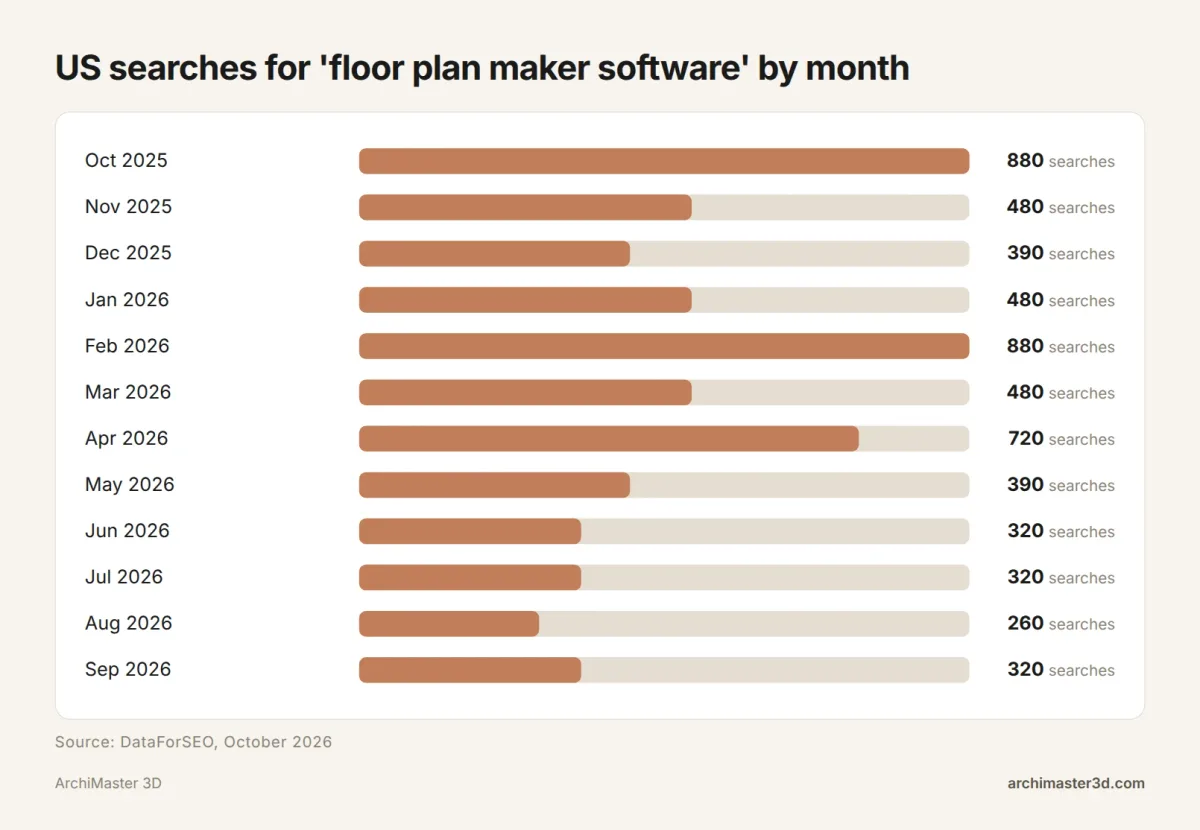
"Floor plan maker software" gets about 480 searches a month in the US, and 5,920 searches over the 12 months to September 2026 (DataForSEO, October 2026). Searches peaked at 880 in October 2025 and February 2026 and dipped to 260 in August 2026.
For the wider picture on remodels and design tools, see our home design statistics for 2026.
From a scanned plan to a 3D render in ArchiMaster 3D
If you already have a plan on paper, this is the route from that sheet to a finished room in ArchiMaster 3D.
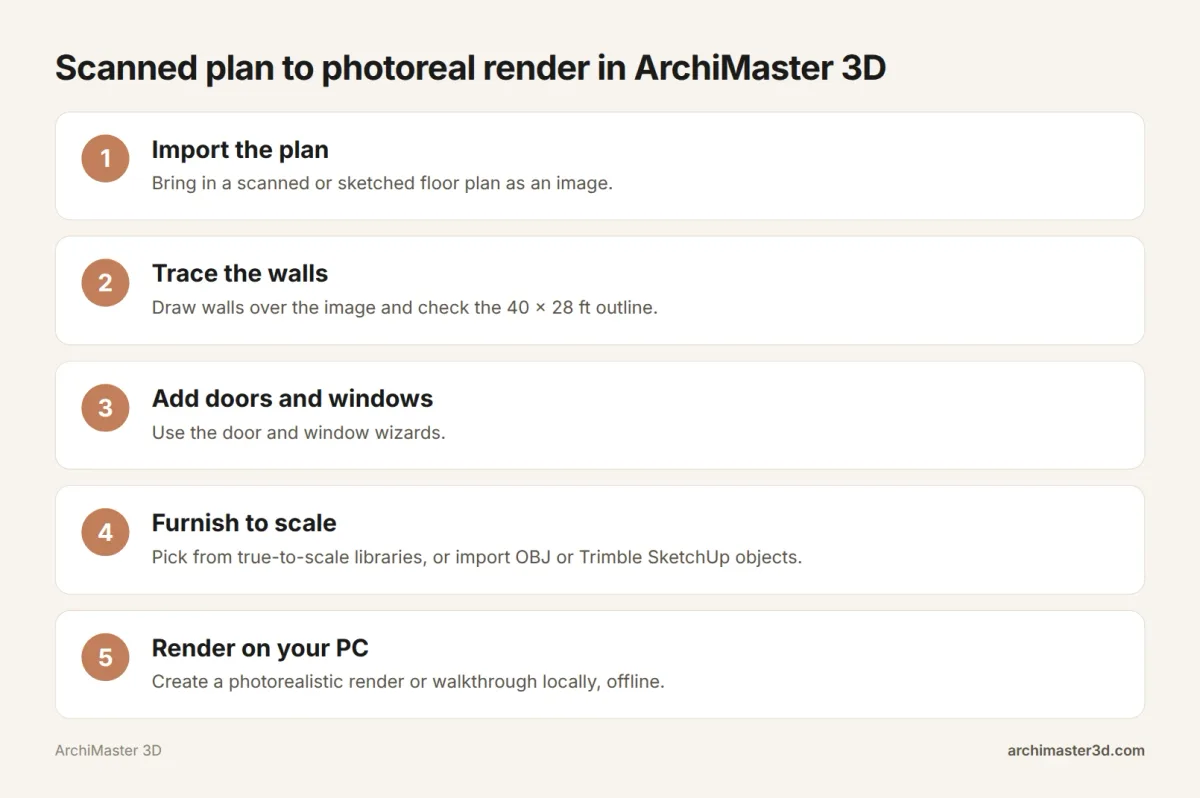
- Import the plan. Bring in your scanned or sketched floor plan as an image.
- Trace the walls. Draw walls over the image to scale, then check the overall dimensions against your paper plan.
- Add doors and windows with the door and window wizards.
- Furnish to scale from the true-to-scale libraries, including 200+ kitchen and bath cabinets and hundreds of lighting fixtures. Add custom pieces by importing OBJ or Trimble SketchUp files.
- Render on your PC. Create a photorealistic render or walkthrough tour locally, offline, with the project file saved on your own drive.
For the full walkthrough of step 2, read how to trace a 2D floor plan into 3D.
Try ArchiMaster 3D on your own floor plan
ArchiMaster 3D is home design software for 64-bit Windows 11, 10, 8 or 7. It comes in four editions on one engine: Expert, Ultimate Home Design, Kitchen & Bath, and Landscape & Deck. Each is a one-time licence with no subscription, renders photorealistic images on your own PC and works offline. The ArchiMaster 3D floor plan software page shows what each edition covers.
The best test is your own plan. Download the 10-day free trial, draw the 40 x 28 ft test plan or your own home, and score it with the checklist above. If you buy and it is not right, the 30-day money-back guarantee covers you. See the current prices when you are ready.
- What software do HGTV designers use?
- No page ranking for this search names the software HGTV's designers use. For a similar before-work view of your own home, use a tool that makes 3D renders, such as D5 Render (rated 4.8/5 on G2) or ArchiMaster 3D.
- What software does Joanna Gaines use for home design?
- No page ranking for this search names her software, so treat confident answers online with caution. To plan finishes in a similar spirit, choose a 3D tool with a good material library and photoreal rendering, such as Homestyler (4K rendering) or ArchiMaster 3D, whose libraries include hardwood, slate and ceramic flooring and granite and marble countertops.
- What is the best free interior design software?
- Sweet Home 3D is the strongest fully free choice: it is open source, does 2D and 3D, and Deskflex lists it for Mac, Windows, Linux and web. Homestyler is a free online option with 4K rendering and cloud saving. For a quick furniture layout in the browser, Floorplanner's free Basic plan includes its full 3D model library.
- Can ChatGPT do interior design?
- Partly. ChatGPT can suggest styles, colour palettes and furniture arrangements, and describe a layout in words, but it does not measure your room or hold scale. Use it for ideas, then draw the room in a floor plan maker with your own tape-measure numbers, and check the layout in 3D before you buy furniture.
- Is there a floor plan maker for Mac?
- Yes. Deskflex lists Mac versions of RoomSketcher, SmartDraw, SketchUp, Sweet Home 3D and AutoCAD, and web tools such as Floorplanner, Planner 5D, Canva and Homestyler run in a browser. ArchiMaster 3D is not an option on a Mac: it is Windows only, with no free version.
- Can I make a floor plan on Windows without a subscription?
- Yes. Sweet Home 3D is free and lists a Windows version, and G2 lists ZWCAD as a one-time purchase for 2D drafting. ArchiMaster 3D is also a one-time licence with no subscription. Try it free for 10 days, backed by a 30-day money-back guarantee.
Plan it in 3D before you build: walls, furniture and finishes to scale, then walk through it.
Try it free for 10 days- Who
- Written by Ahmed El Alaoui, editorial direction & marketing analytics at Richdale AI, the company behind ArchiMaster 3D.
- How
- Drafted with AI assistance from the ArchiMaster 3D Ultimate Home Design feature set and checked claim by claim against the product fact sheet on Oct 25, 2026. Photographs are stock illustrations, not renders from the software.
- Why
- Help homeowners see a room or a whole house before they spend money building it.
Ready to design with confidence?
See which edition fits the space you’re designing.