
 FIG·01
Floor plan CAD software runs from free, open-source drafting programs to professional subscriptions, and the first page also includes home design apps that skip CAD altogether. The right pick depends on one question: does a drafter, permit office or contractor need a CAD file from you, or do you need a dimensioned plan and a view of the room? Here are six common options, with prices where the first page shows them.
Floor plan CAD software: the short answer
- AutoCAD and AutoCAD LT (Autodesk): AutoCAD is precision 2D and 3D CAD, from $175 a month billed annually (matterport.com). AutoCAD LT is Autodesk's "best-in-class tool for 2D CAD drafting" (autodesk.com).
- LibreCAD: a free, open-source 2D CAD desktop program. Not reviewed on page one.
- DraftSight (Dassault Systèmes): a CAD program. Not reviewed on page one, which shows no price or feature list for it.
- SoftPlan: residential CAD/BIM that imports and exports AutoCAD's DWG format (softplan.com).
- Floor Plan Creator: an Android app and browser tool with a free plan of 15 projects (floorplancreator.net).
- Home design software such as ArchiMaster 3D: a Windows desktop program built for houses, sold as a one-time licence (see current prices). Its Expert edition adds working drawings, dimension styles, vector printing, and window and door schedules.
There is no single best program. matterport.com rates AutoCAD best for technical documentation, while roomsketcher.com names its own RoomSketcher best overall. Pick real CAD if someone needs a CAD file from you. Otherwise a home design program gives you the plan and a 3D view from one model.
Floor plan CAD software compared
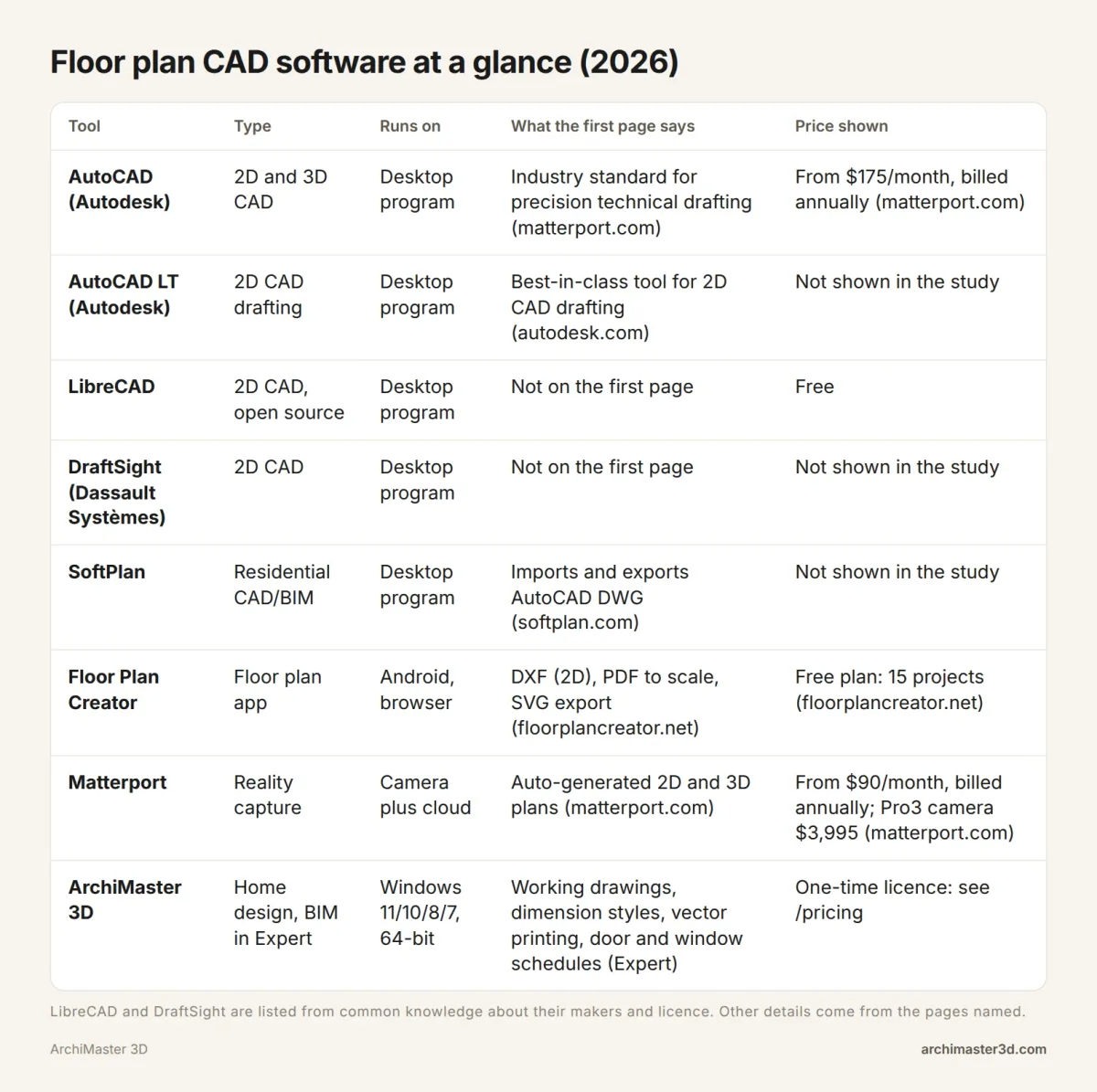
These eight tools fall into three groups. General CAD (AutoCAD, AutoCAD LT, LibreCAD, DraftSight) gives you drawing tools, and you build the plan from lines, arcs and symbols. Residential CAD/BIM (SoftPlan) draws walls as building parts and, by SoftPlan's own description, automates construction documents, materials lists and cost estimates. Home design and capture tools (Floor Plan Creator, Matterport, ArchiMaster 3D) are built around rooms rather than lines.
| Tool | Good for (per the first page) | Watch out for | Pricing detail |
|---|---|---|---|
| AutoCAD | "Drafting technical AEC documentation from scratch"; dimensional control and accuracy (matterport.com) | You draw and dimension every wall yourself | Subscription, typically billed annually (matterport.com) |
| AutoCAD LT | 2D CAD drafting and drawing (autodesk.com) | Built for 2D, so 3D views need another tool | No price in the study |
| LibreCAD | Free, open-source 2D CAD | Not reviewed on the first page; you bring the drafting skill | Free |
| DraftSight | CAD from Dassault Systèmes | Not reviewed on the first page | No price or features in the study |
| SoftPlan | Construction documents, 3D renderings, materials lists; DWG import and export (softplan.com) | Aimed at architects, builders and remodelers | No price in the study |
| Floor Plan Creator | "Free and simple" (reddit.com); 3D view, print to scale, Bluetooth laser meters on Android (floorplancreator.net) | Free plan capped at 15 projects (+15 per renewal); high-resolution PNG, JPEG and SVG export sit under the $9.99 tier | Free plan; paid tiers on floorplancreator.net |
| Matterport | Accurate as-builts; auto-generated 2D and 3D plans; virtual tours (matterport.com) | The Pro3 camera "may be out of budget for smaller teams" (matterport.com) | From $90/month billed annually; Pro3 camera $3,995 (matterport.com) |
| ArchiMaster 3D | Homes; photorealistic renders on your own PC; Expert working drawings and schedules; works offline | Windows only; no free version; we list no CAD file export, so use CAD if a drafter needs a file | One-time licence, see current prices |
Matterport works differently from all of them. It captures an existing space with a camera instead of drawing one, which matters if you need an accurate record of a building that already stands.
Easy-start tools: RoomSketcher, Planner 5D, Floorplanner and Cedreo
The "best floor plan software" lists on page one lean heavily on tools that need no CAD experience. archivinci.com calls Floorplanner, RoomSketcher and Planner 5D "user-friendly and ideal for quick layouts without CAD experience." Here is what the lists say about each.
- RoomSketcher: 2D and 3D plans with a drag-and-drop interface, Live 3D walkthroughs, custom branding, redraw services and cloud syncing. Its own site ranks it best overall and says over 10 million people use it (roomsketcher.com).
- Planner 5D: 2D and 3D plans on desktop and tablet, popular with DIY home designers for its wide furniture library and 3D walkthroughs. roomsketcher.com notes its renders "can appear dark without added lighting."
- Floorplanner: a web-based tool for quick, basic 2D and 3D layouts with instant 3D, though "its customization options are somewhat limited" (roomsketcher.com).
- Cedreo: rated "best for conceptual design" by matterport.com. roomsketcher.com groups it with SketchUp as suited to "specialized 3D modeling" but lacking ease of use.
Does AutoCAD do floor plans?
Yes. Autodesk lists both AutoCAD and AutoCAD LT on its floor plan software page (autodesk.com). matterport.com calls AutoCAD "the industry standard for precision technical drafting" and rates it best for "drafting technical AEC documentation from scratch."
The trade-off is how it treats a wall. In AutoCAD a wall is two lines you draw, offset and dimension yourself. In a home design program a wall is a wall, with thickness, openings and a 3D view built in.
AutoCAD vs AutoCAD LT for floor plans
Autodesk describes AutoCAD as 2D and 3D CAD with "AI-automations, and collaboration features," and AutoCAD LT as its tool for 2D drafting and drawing (autodesk.com). A floor plan is a 2D drawing, so LT covers it. Choose full AutoCAD if you also need 3D work in the same program.
For a step-by-step comparison on a sample plan, read AutoCAD LT vs ArchiMaster 3D on a 10x12 office plan.
What AutoCAD costs
AutoCAD uses subscription licensing from $175 a month, typically billed annually (matterport.com). The first page shows no AutoCAD LT price, so check Autodesk's site for it.
One task, two routes: dimensioned walls, door swings and a sheet export
Here is one small job described in both kinds of software. This compares the steps each route takes. It is not a timed test, and we give no timings.
The task: a 12 x 10 ft room
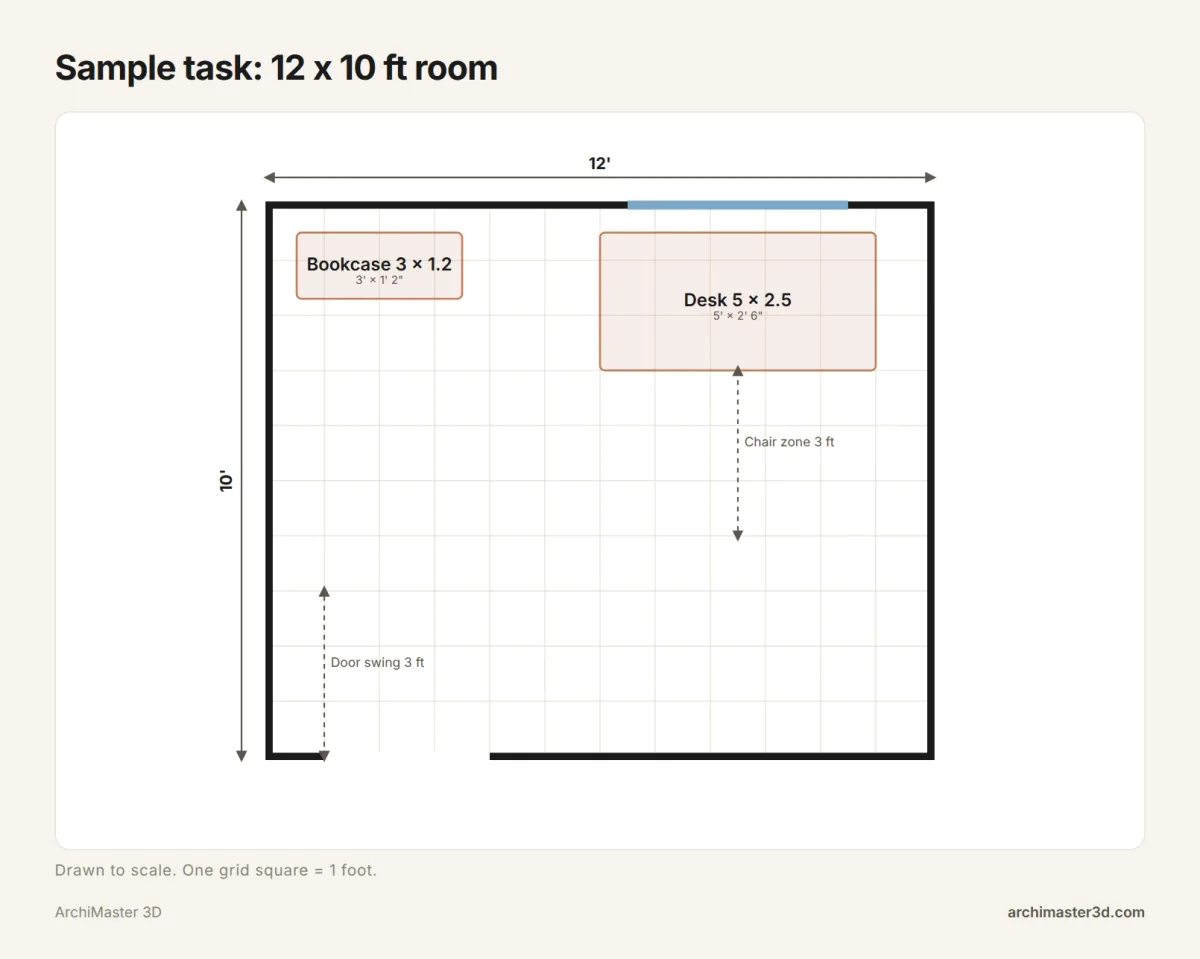
The room is 12 x 10 ft with one 3 ft door, one 4 ft window, a 5 x 2.5 ft desk and a 3 ft bookcase. Every wall gets a dimension, the door shows its swing, and the result goes on a printed sheet.
The CAD route (AutoCAD LT, DraftSight, LibreCAD)
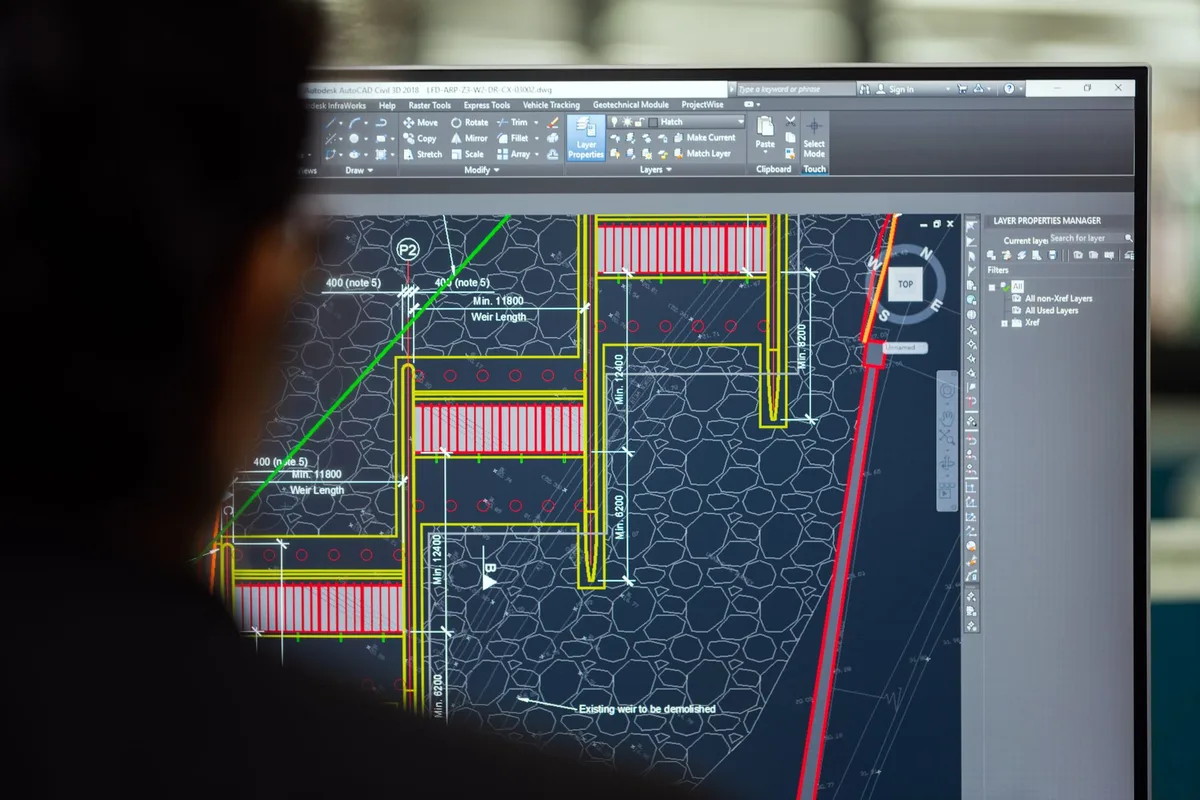
In general CAD practice you set your units first. Then you draw the wall lines, offset them for wall thickness and trim the corners. You break the lines where the door and window go, insert a door symbol with its swing arc, and add a dimension to each wall. Finally you set up a layout sheet and plot it to PDF. If you want to see the room in 3D, you model it separately.
The home design route (ArchiMaster 3D)
If you have a scanned or sketched plan, import it as an image and draw the walls over it. If you don't, place the walls directly to your measurements. Add the door and window with the door and window wizards. In the Expert edition you then set dimension styles and print working drawings with vector printing. The same model gives you the 3D view and photorealistic renders.
For a full walkthrough of the tracing step, see how to trace a 2D floor plan into 3D.
The steps side by side
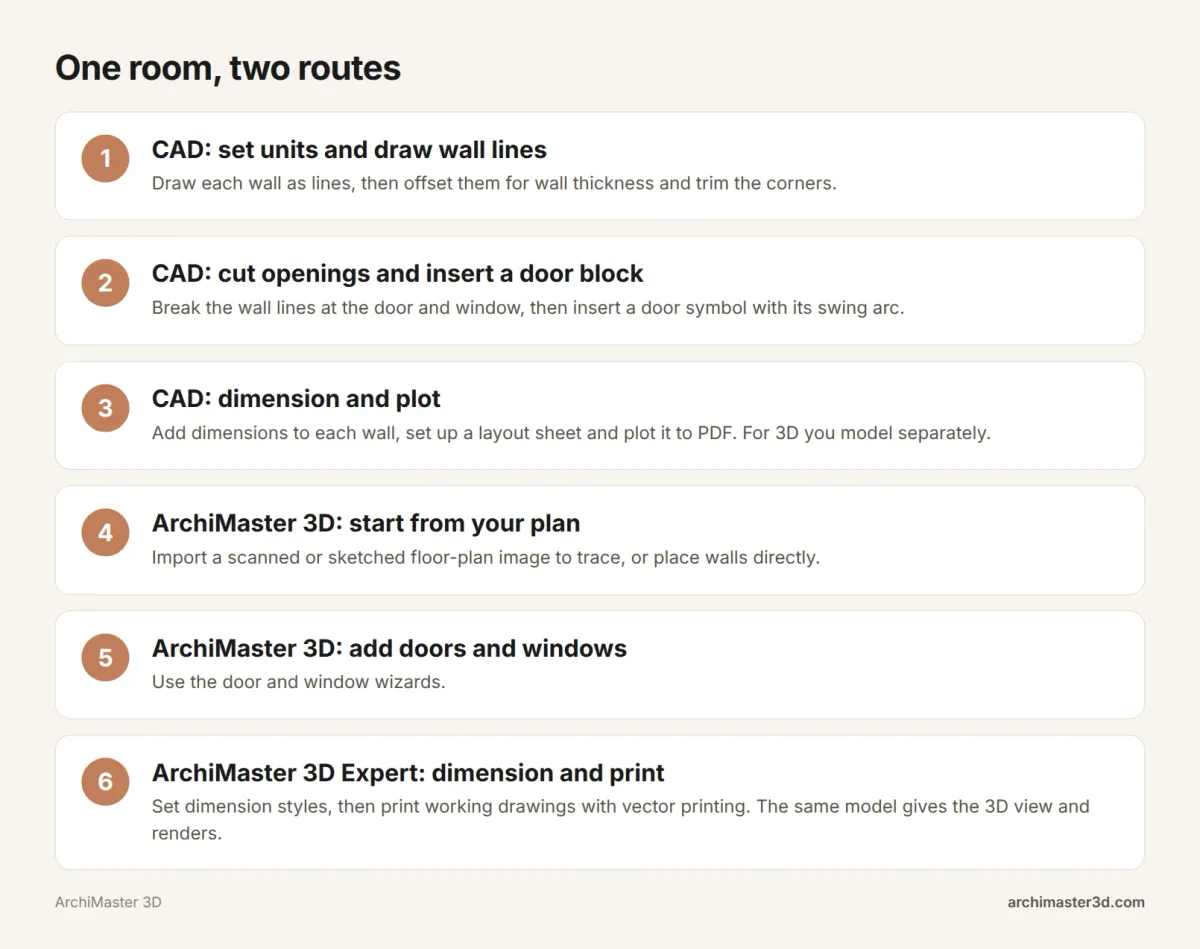
Each route needs extra work somewhere. CAD gives you no 3D view unless you build one in another step or another program. ArchiMaster 3D's documented output is printed working drawings in Expert, and we list no CAD file export, so if a drafter asks you for a CAD file, that is a job for a CAD program.
Someone who already drafts in CAD will be comfortable with either route. A homeowner usually just wants the plan and a picture of the room, and the home design route gets both from one model.
Free floor plan CAD software
What is the best free floor plan software? It depends on what you need. For free desktop CAD, LibreCAD is the usual choice, though page one doesn't review it. For a free tool that's quick to learn, a Reddit thread on the first page calls Floor Plan Creator "free and simple," and its site lists 3D views and printing to scale. Floorplanner, RoomSketcher and Planner 5D are the easy-start tools archivinci.com names, though the study doesn't show their free terms.
Free CAD programs to download
LibreCAD is free, open-source 2D CAD for the desktop, a fit if you want a true CAD program and are willing to learn drafting. A YouTube result on the first page, "5 FREE CAD Programs to Design Any Project," walks through more free options.
Free browser and app tools
Floor Plan Creator runs as an Android app and as a web app in any browser (floorplancreator.net). Its free plan gives 15 projects, with 15 more on each renewal, and extra 15-project packs cost $4.95. The site lists export as image, PDF to scale, DXF (2D) and SVG, but doesn't say which the free plan includes, so check before you rely on one. Our roundup of free room planner apps covers more.
Where can I find free CAD floor plans?
If you want plans of your own home, ask the previous owner or builder for the drawings, or ask your local building department whether it keeps permit drawings on file. If all you have is a paper plan, scan it. ArchiMaster 3D can import a scanned floor-plan image to trace over.
If you want ready-made plans to download, the related search "AutoCAD floor plan download" shows many people do. Free house plan and CAD block libraries offer finished drawings, often as DWG files. Check the licence before you use one, and remember a stock plan is a starting point, not a drawing of your site.
How to draw a floor plan for free
Measure every wall, including where each door and window starts. Sketch the room on graph paper or in a free tool, drawing walls to your measurements. Add doors with their swing, windows and fixed items like radiators. Then dimension every wall and print.
ArchiMaster 3D has no free version. There is a 10-day free trial and a 30-day money-back guarantee.
Can SketchUp be used for floor plans?
Yes. matterport.com rates SketchUp "best floor plan software for 3D manipulation." roomsketcher.com says it suits specialized 3D modelling but lacks ease of use, so expect a learning curve if you have never modelled in 3D.
If you already have SketchUp models, ArchiMaster 3D can import Trimble SketchUp files and OBJ files as custom 3D objects. See how to import SketchUp models, or read ArchiMaster 3D vs SketchUp for a fuller comparison.
Can ChatGPT or AI draw floor plans?
A general chat AI can describe a layout or suggest room sizes. Treat what it gives you as a rough idea, not a dimensioned drawing to build from.
On the first page, AI shows up inside CAD and capture tools instead:
- Autodesk mentions "AI-automations" in AutoCAD (autodesk.com).
- SoftPlan lists "AI Enhanced 3D" (softplan.com).
- Matterport auto-generates 2D and 3D floor plans from a single capture session (matterport.com).
- A YouTube result shows turning an AutoCAD plan into a 3D floor plan with Gemini AI (youtube.com).
So the best AI for floor plans depends on your start point: an existing space suits capture, and an existing CAD plan suits the CAD tools. For AI on the image side, see our guide to AI rendering tools.
When a homeowner actually needs CAD
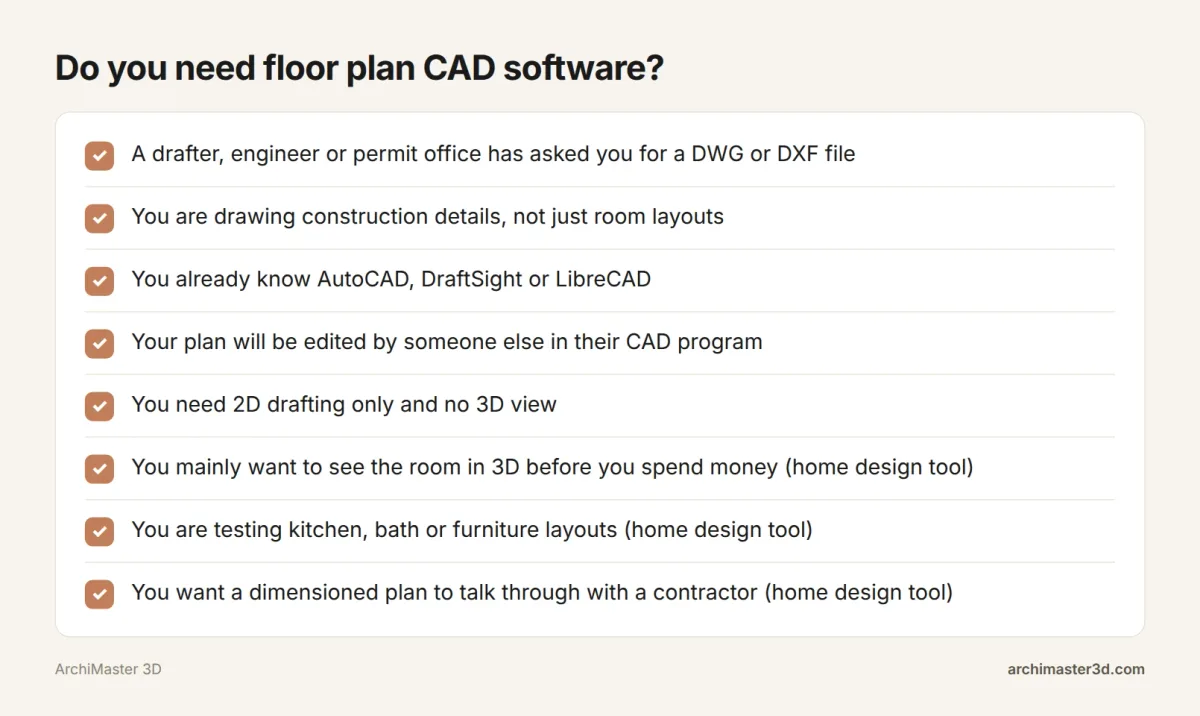
Tick each item that applies to you:
- Someone asks you for a DWG or DXF file.
- You are drafting construction details.
- A permit office or contractor wants drawings in a CAD format.
- You will pass the drawing back and forth with a drafter or architect who works in CAD.
- You already know CAD.
- You want to see the room in 3D before you spend money.
- You are testing a kitchen or bath layout.
- You want a dimensioned plan to talk through with a contractor.
If two or more of items 1 to 5 apply, CAD (or a professional who uses it) is the better fit. If your ticks are mostly in items 6 to 8, a home design program will do the job. For more picks on both sides, see our guide to the best CAD home design software.
How many people search for floor plan CAD software
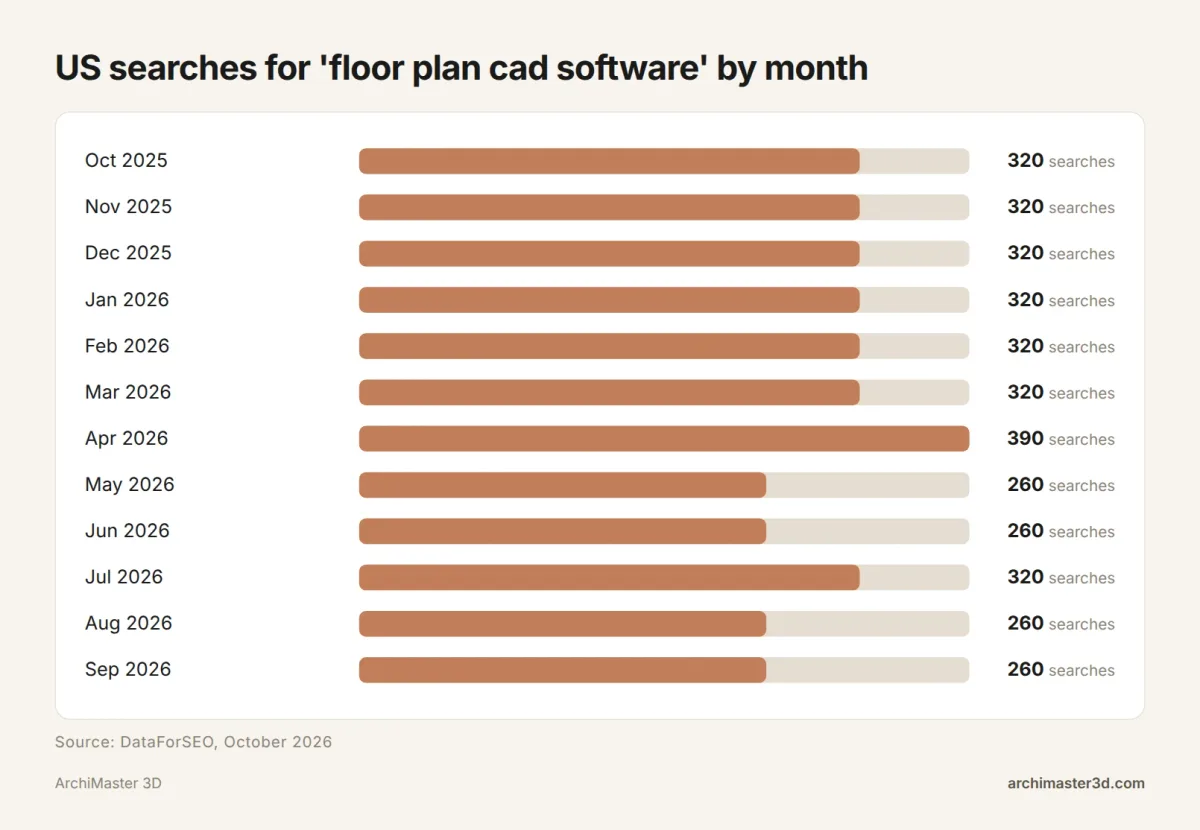
"Floor plan cad software" gets 320 US searches a month, ranging from 260 to 390 over the last 12 months with a peak of 390 in April 2026 (DataForSEO, October 2026). For wider numbers, see our 2026 home design statistics.
Drawing floor plans in ArchiMaster 3D
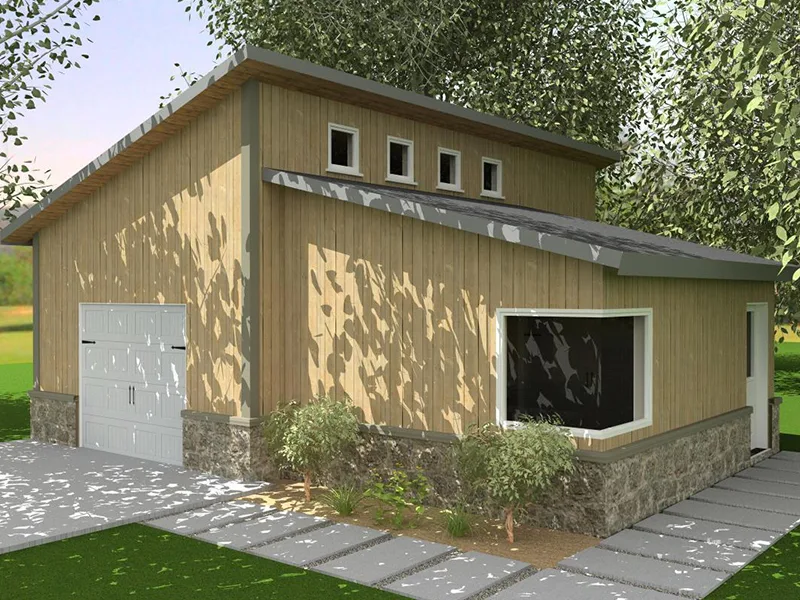
ArchiMaster 3D is floor plan software for the desktop, built for homes and running on 64-bit Windows 11, 10, 8 or 7. It works offline and keeps your project file on your own drive. The Expert edition builds BIM models with working drawings, SmartView elevations and sections, dimension styles, vector printing, and window and door schedules. All four editions share one engine and render photorealistic images locally on your PC. There is no Mac, iPad or browser version, and no free version. It is a one-time licence with no subscription, and prices are on the pricing page. Start with the 10-day free trial or try the Expert edition, backed by a 30-day money-back guarantee, and check the full feature list first.
- What is the best program to create floorplans?
- AutoCAD is the pick for technical plans, and a home design program suits most homeowners better. matterport.com rates AutoCAD best for drafting AEC documentation from scratch. If you mainly want a dimensioned plan and a 3D view of your own house, a Windows program such as ArchiMaster 3D gives you the plan and a 3D view from one model.
- What software can I use to draw floor plans?
- You can use CAD programs such as AutoCAD, AutoCAD LT, LibreCAD or DraftSight, residential CAD such as SoftPlan, or home design tools such as RoomSketcher, Planner 5D, Floor Plan Creator and ArchiMaster 3D. CAD suits people who need to hand over a drawing file. Home design tools suit people planning their own rooms.
- How to draw up a floor plan for free?
- Measure each room, then draw it in a free tool or on graph paper. LibreCAD is free desktop CAD, and Floor Plan Creator has a free plan with 15 projects (floorplancreator.net). Draw the walls to your measurements, add doors with their swing and windows, then dimension every wall before you print.
- Is AutoCAD LT enough for house floor plans?
- Yes, for 2D plans AutoCAD LT is enough, since Autodesk describes it as a best-in-class tool for 2D CAD drafting. You draw walls, openings and dimensions yourself, which takes practice. If you also want to see the house in 3D, you need a 3D program alongside it or a home design tool instead.
- Does ArchiMaster 3D run on a Mac?
- No, ArchiMaster 3D does not run on a Mac. It is desktop software for 64-bit Windows 11, 10, 8 or 7, and there is no macOS, iPad, Chromebook or browser version. The HomeVR companion app on iOS and Android is a viewer for walkthroughs, not the design software itself.
- Is there a free version of ArchiMaster 3D?
- No, there is no free version or free plan of ArchiMaster 3D. You can try it with the 10-day free trial, and every edition is a one-time licence with a 30-day money-back guarantee. Current prices for the four editions are on the pricing page, since they change.
Plan it in 3D before you build: walls, furniture and finishes to scale, then walk through it.
Try it free for 10 days- Who
- Written by Ahmed El Alaoui, editorial direction & marketing analytics at Richdale AI, the company behind ArchiMaster 3D.
- How
- Drafted with AI assistance from the ArchiMaster 3D Expert feature set and checked claim by claim against the product fact sheet on Oct 26, 2026. Photographs are stock illustrations, not renders from the software.
- Why
- Help designers and serious self-builders understand what working drawings and building objects do for a project.
Ready to design with confidence?
See which edition fits the space you’re designing.