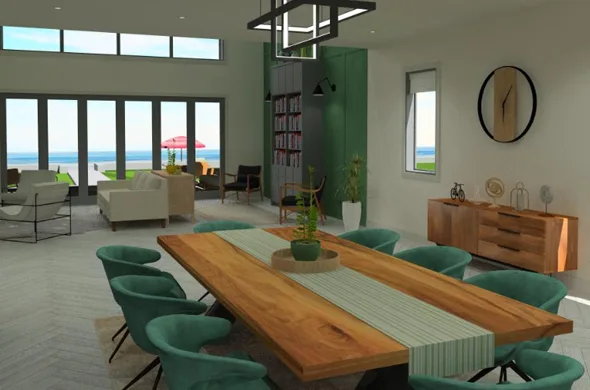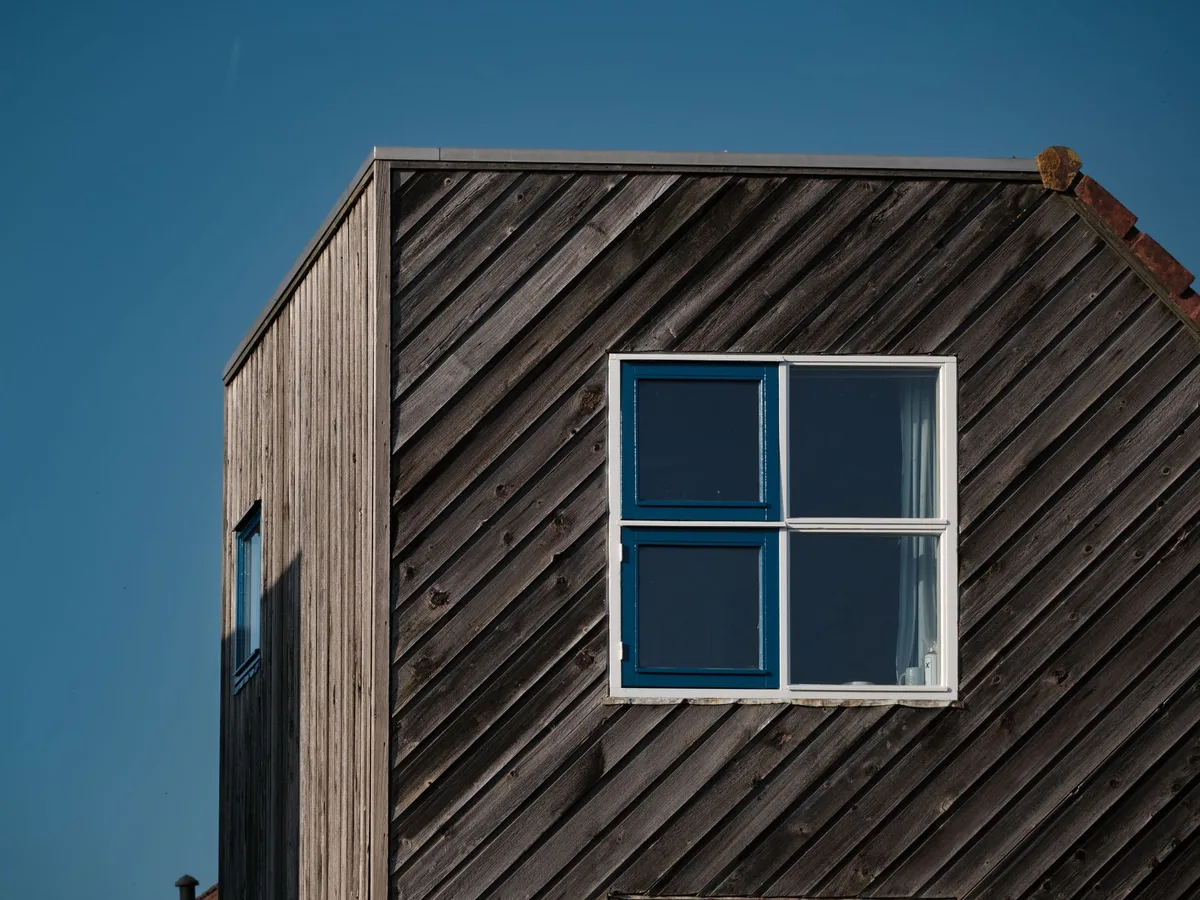

 FIG·01
To draw a window on a floor plan, break the wall where the window sits, fill the gap with thin glass lines, add the symbol for its type and label its size. The six steps below work on paper or on screen. After them you'll find the symbol for each window type.
How to draw a window on a floor plan (quick answer)
- Measure the window's distance from the nearest corner and its overall width.
- Mark both edges on the wall and erase the wall's poché (the solid or hatched fill) between them.
- Draw two or three thin parallel lines inside the wall thickness across the gap. These lines are the frame and glass.
- Add a thin line on the outside face for the sill if your drawing style uses one.
- Draw the type symbol: a swing arc for a casement, offset panes for a slider, an angled projection for a bay.
- Label the width, height and sill height, or add a tag that points to a window schedule.
A floor plan is a horizontal cut through the building, so a window shows as a gap in the wall, not as a picture of the glass. A reply on facebook.com puts that cut at 1.5 to 1.8 meters above the floor.
The guide on centerforarchitecture.org says to "use the symbols above," and Microsoft's Visio help page says to drag window shapes onto walls. Neither page explains sill heights, rough openings or what each symbol turns into once the house is built. This guide covers all three.
What windows look like in blueprints
Why the wall is cut, not the window drawn
Picture slicing the house horizontally at the cut height and looking straight down. Anything the slice passes through, such as walls and windows, is drawn as a cut section. Anything below the slice, such as floors and furniture, is drawn as seen from above. A window sits in the wall at that height, so you draw the wall opening, not the glass pane.
Glass lines, frame lines and the sill
Glass is drawn as one or two thin lines in the middle of the wall thickness. The frame appears as short lines across the wall at each side (jamb). A thin line on the outside face marks the sill.
To draw glass windows in a plan, use a lighter line weight for the glass than for the walls, so the opening reads as lighter. On paper, that means a hard, sharp lead for glass and a softer lead for walls.
Windows above the cut line (clerestory and high windows)
High windows sit above the cut plane, so they break the usual rule. Many drafters draw them with dashed lines and add a note with the sill height.
Elevations carry the vertical facts. A snippet on scribd.com puts it this way: elevation drawings give "the height, width, and placement" of windows. The plan shows where a window sits along the wall, and the elevation shows how high it sits.
Window symbols by type: casement, sliding, fixed, double-hung and bay
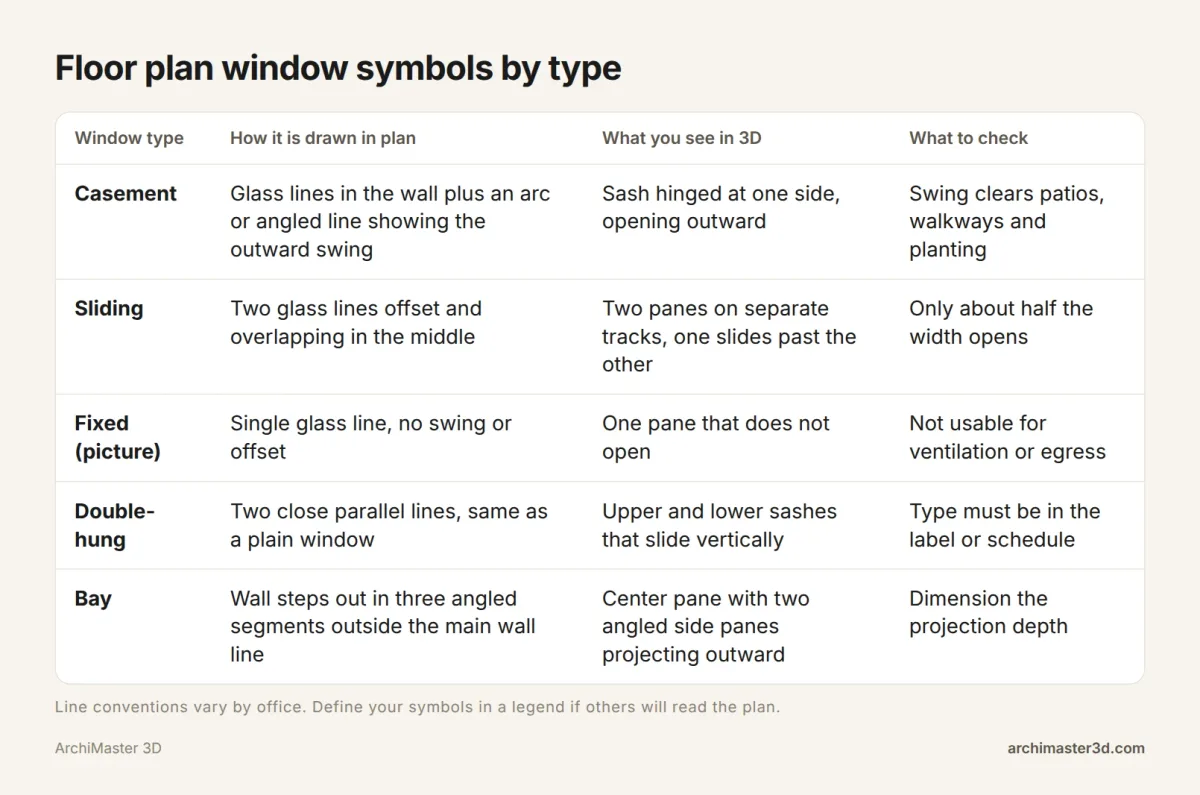
The table pairs each plan symbol with what you'll see in 3D and the question the symbol should prompt. If you searched for a PDF version, print this table and the checklist near the end of this post. Together they work as a printable symbol sheet to keep beside your graph paper.
Casement window symbol
Draw the frame and glass lines in the wall. Then add a quarter arc or an angled line showing which way the sash swings out. The swing is your reminder to keep that side clear of patios, walkways and shrubs.
Sliding window symbol
Draw two glass lines, slightly offset and overlapping in the middle, because the panes run on separate tracks. Some drafters add a small arrow on the pane that opens.
Fixed (picture) window symbol
A fixed window gets a single glass line with no swing and no offset, because nothing opens.
Double-hung window symbol
In plan, a double-hung window usually looks like a plain window: two close lines. Its sashes move up and down, so the plan has no way to show how it opens. Put the type in the label or the schedule.
Bay window symbol
For a bay, the wall steps out in three angled segments: typically a center pane with an angled side pane on each side. Draw the projection outside the main wall line and dimension how far it sticks out.
How to draw windows on a floor plan by hand, step by step
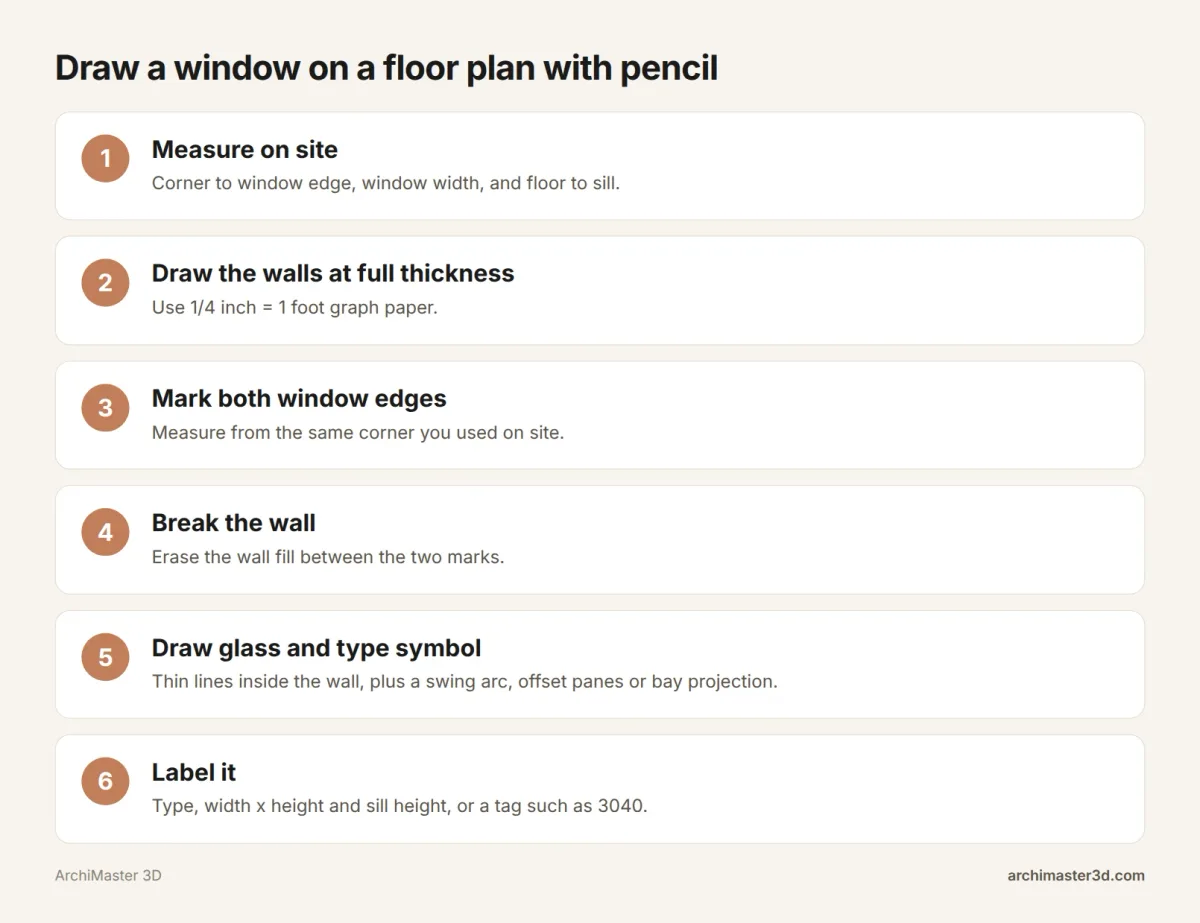
What you need: pencil, scale ruler, graph paper
You need four things:
- Graph paper at 1/4 inch = 1 foot. On common quad paper, that is one square per foot.
- A pencil.
- An eraser.
- A tape measure.
Measuring each window on site
The centerforarchitecture.org sequence is a good start: sketch the room's shape, look at each wall for openings, mark them, then draw the symbols. Add three measurements per window:
- From the corner to the edge of the window trim.
- Across the window.
- From the floor to the bottom of the glass. This is the sill height.
Write all three on the sketch while you're standing at the window.
Drawing and labeling
- Draw the walls at full thickness.
- Mark both window edges, measuring from the same corner you used on site.
- Erase the wall fill between the marks.
- Draw the glass lines and the type symbol.
For the label, a common US shorthand is a four-digit tag: 3040 means 3 ft 0 in wide by 4 ft 0 in tall. If anyone else will read the plan, define the tag in a note.
Draw windows before furniture. Beds, desks and sofas often go under or beside them.
Sill heights, head heights and rough openings on a plan
Sill height and head height
Sill height runs from the floor to the bottom of the opening. Head height runs from the floor to the top. Neither fits in the plan symbol, so put both in the label, the schedule or the elevation.
Rough opening vs window size
The framed hole in the wall, called the rough opening, is a little larger than the window unit. The extra room lets the installer shim and seal the window. Take the rough opening from the manufacturer's listing instead of guessing. Then dimension to the same point on every window, either the center or the edge.
Bedroom egress windows
A bedroom window may also need to serve as an emergency exit. Codes limit how high its sill can sit and how large the opening must be. Ask your local building department which numbers apply before you fix the sill height.
Worked example: windows on a 12 x 12 ft bedroom plan
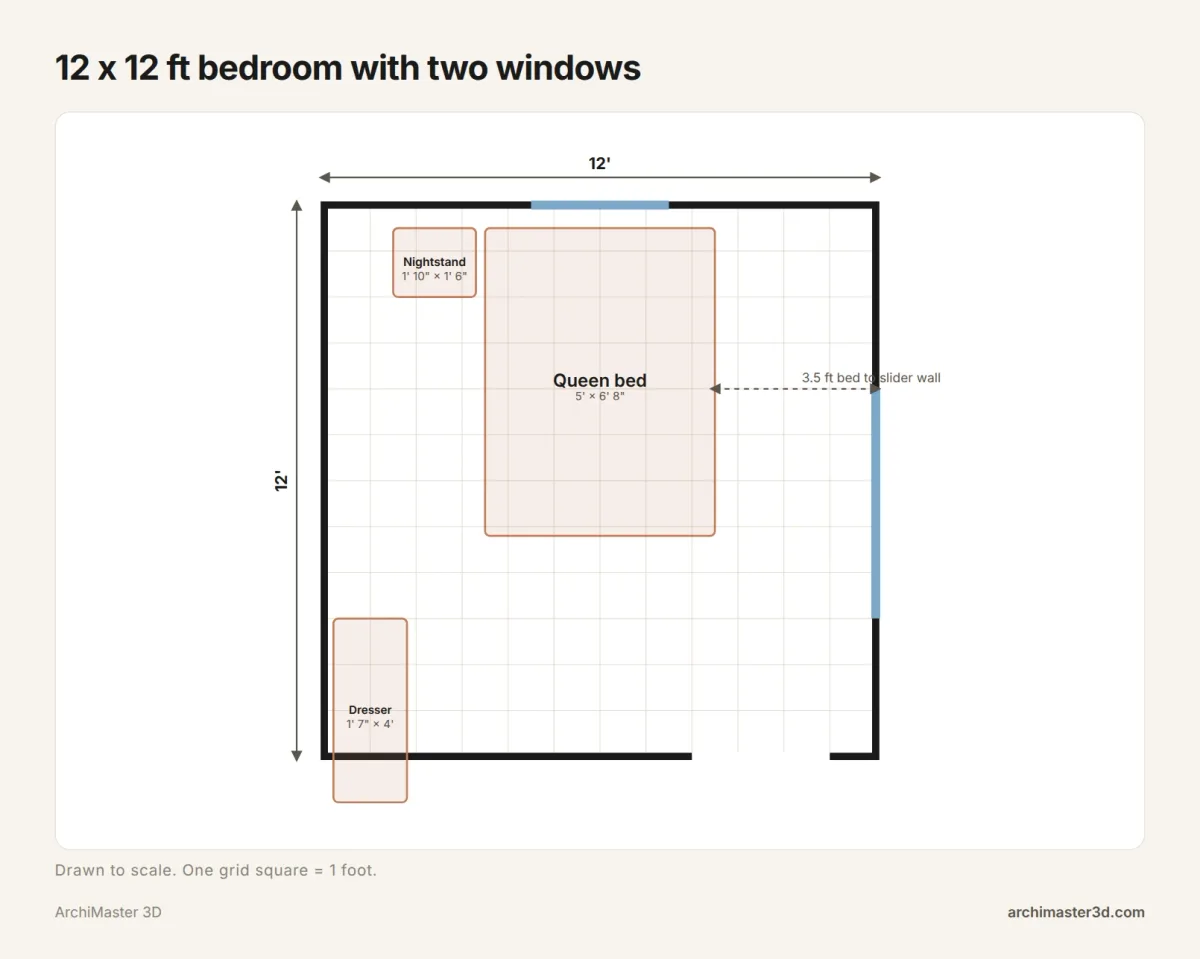
| Opening | Wall | Starts from corner | Width | Ends at |
|---|---|---|---|---|
| Casement window | Top | 4.5 ft from left | 3 ft | 7.5 ft |
| Sliding window | Right | 4 ft from top | 5 ft | 9 ft |
| Door | Bottom | 8 ft from left | 3 ft | 11 ft |
The casement is centered on the top wall: (12 − 3) / 2 = 4.5 ft. The queen bed runs from 3.5 to 8.5 ft, so its center also falls at 6 ft, and the window sits directly over the headboard. Check that the sill clears the headboard height.
The slider sits on the right wall, 3.5 ft from the edge of the bed. It doesn't swing into the room or out over anything outside, so that walkway stays usable. To finish the plan, label each window with its type, width x height and sill height.
Drawing windows in software: Visio, free planners and AI

Microsoft Visio
Per support.microsoft.com, you start a floor plan from the Maps and Floor Plans category. You drag door and window shapes onto walls from the Walls, Shell and Structure stencil, and you add dimensions by right-clicking a wall and selecting Add a Dimension. The help page covers placement only. Add your own text label to each window for its type, size and sill height. The same page says Visio for the web cannot draw floor plans.
Free floor plan programs
Sweet Home 3D is a well-known free desktop planner. Our free room planner apps we compared cover more options, and the 12 floor plan makers compared include paid tools. ArchiMaster 3D has no free version, only a 10-day free trial.
Can ChatGPT or AI draw floor plans?
General chatbots can describe a layout or suggest where a window might go. They aren't built to produce a measured, to-scale plan with sill heights and rough openings you can build from. For that, use dedicated floor plan software. If you want AI imagery of a finished room, see our guide to AI rendering tools.
AutoCAD
AutoCAD, Autodesk's desktop CAD program, is widely used for 2D drafting. For how it handles a full room plan, read AutoCAD LT vs ArchiMaster 3D.
Any of these tools will place a window symbol. The harder question is whether you can see what that symbol becomes in the room.
Check each window symbol in 3D before you build
A plan symbol tells you where a window is and which way it opens. A 3D view shows you more:
- Whether the sill clears a countertop or a headboard.
- Whether a casement swing hits a deck rail.
- How much daylight reaches the room.
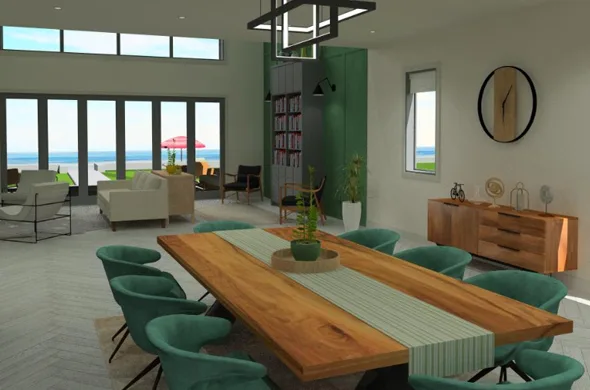
ArchiMaster 3D is desktop software for 64-bit Windows 11, 10, 8 or 7. You can import a scanned or sketched floor plan as an image. You place windows with the window wizard and doors with the door wizard, then view them in photorealistic renders and walkthrough tours. The Expert edition adds SmartView elevations and sections plus window and door schedules, so every size and sill height sits in one list. It works offline, and the project file stays on your own drive.
ArchiMaster 3D is a one-time licence with a 30-day money-back guarantee. You can start the 10-day free trial, try the Expert edition, see current pricing or browse all features. For next steps, read how to trace a 2D floor plan into 3D, model a sloped ceiling and dormer window, or create your first 3D house model.
Window drawing checklist
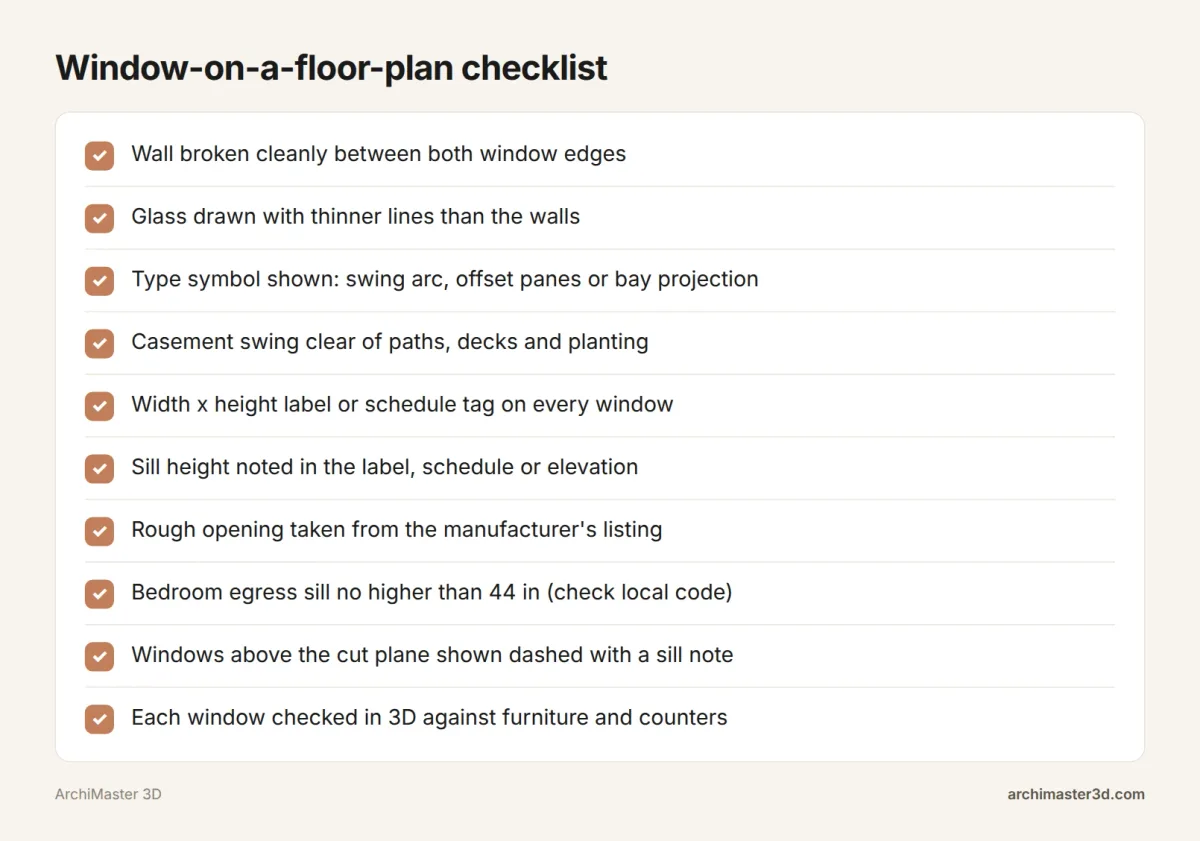
Run these checks before you call the plan finished:
- [ ] Wall broken cleanly between both window edges
- [ ] Glass drawn with thinner lines than the walls
- [ ] Type symbol shown: swing arc, offset panes or bay projection
- [ ] Casement swing clear of paths, decks and planting
- [ ] Size label or schedule tag on every window
- [ ] Sill height noted in the label, schedule or elevation
- [ ] Rough opening taken from the manufacturer's listing
- [ ] Bedroom egress limits confirmed with your building department
- [ ] Windows above the cut plane drawn dashed, with a sill note
- [ ] Each window checked in 3D against furniture and counters
When people look this up
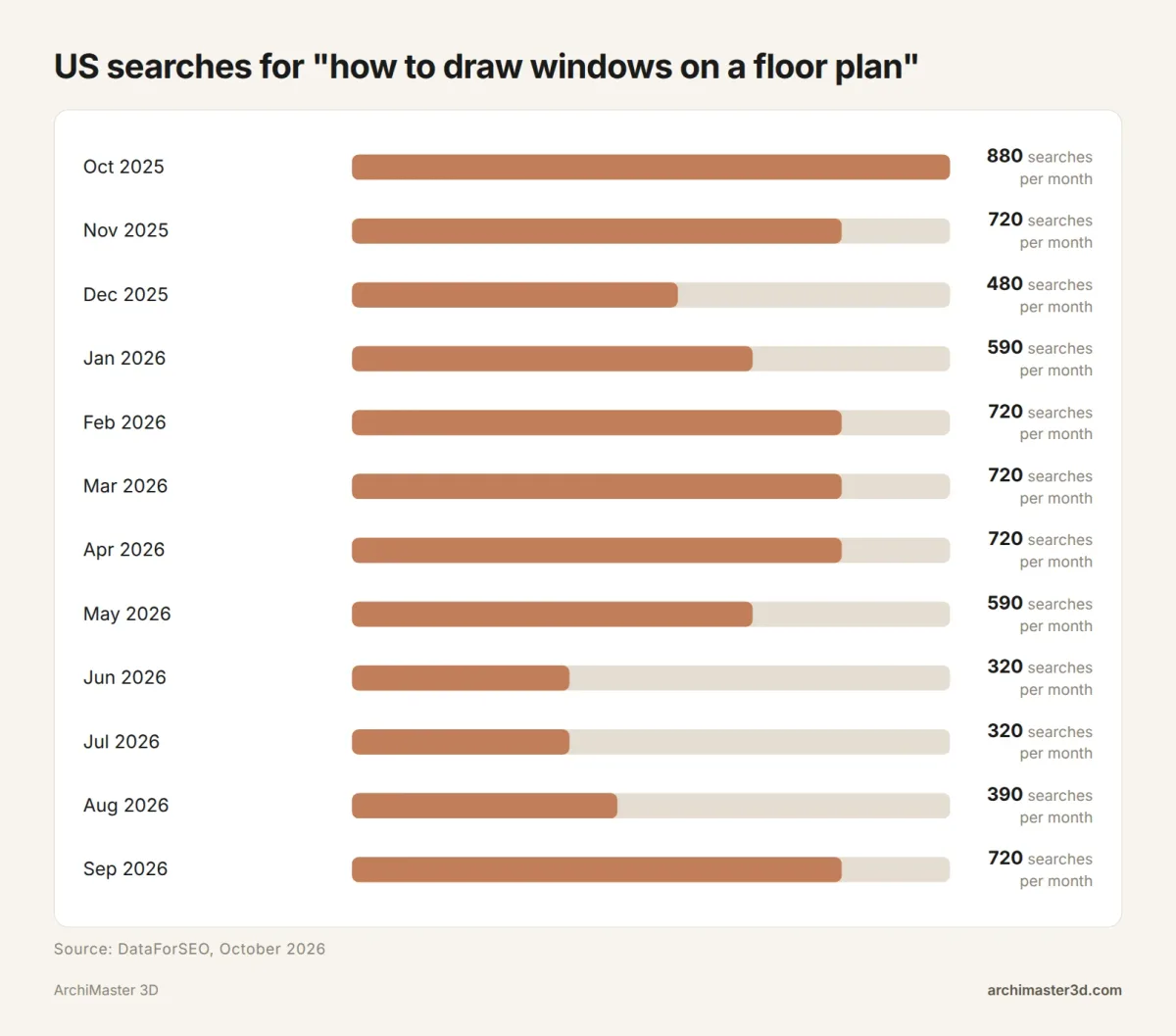
This search drew 7,170 US searches over the last 12 months, about 600 a month (DataForSEO, October 2026). Monthly volume ranged from 320 to 880. It peaked at 880 in October 2025, fell to 320 in June and July 2026, and climbed back to 720 in September 2026. One likely reason is school terms plus winter planning for spring projects, though the data doesn't prove it.
- Can ChatGPT draw floor plans?
- Not in a form you can build from. ChatGPT and similar chatbots can describe a layout or suggest where windows might go. They aren't built to produce a measured, to-scale plan with sill heights and rough openings. For that, use dedicated floor plan software and check the result in 3D.
- Is there a free program to draw floor plans?
- Yes. Sweet Home 3D is a well-known free desktop planner, and our free room planner apps we compared list covers more beginner tools. ArchiMaster 3D has no free version. You can start the 10-day free trial on a Windows PC to draw a plan and view it in 3D.
- What is the best AI to create floor plans?
- There is no single answer, because most AI tools make images rather than buildable plans. For a quick visual, see our guide to AI rendering tools. For a plan with real wall thicknesses, window sizes and sill heights, use floor plan software made for that job.
- What Microsoft program can I use to draw floor plans?
- Microsoft Visio. Its Floor Plan template lets you drag wall, door and window shapes from the Walls, Shell and Structure stencil and add dimensions to walls. Microsoft's support page says Visio for the web cannot draw floor plans at this time, so you need the desktop version.
- How to sketch a floor plan?
- Pick one room and sketch its shape on 1/4 inch graph paper. Walk each wall and mark the doors, windows and openings. Draw the walls at full thickness, break them at each opening and add the symbols. Then draw furniture as seen from above and label each window's size.
- Do sill heights go on the floor plan or the elevation?
- Usually on the elevation, or in a label or window schedule tied to the plan. The plan symbol only shows where a window sits along the wall. A note such as "sill 36 in" or a schedule column carries the height, and the elevation draws it to scale.
Plan it in 3D before you build: walls, furniture and finishes to scale, then walk through it.
Try it free for 10 days- Who
- Written by Ahmed El Alaoui, editorial direction & marketing analytics at Richdale AI, the company behind ArchiMaster 3D.
- How
- Drafted with AI assistance from the ArchiMaster 3D Ultimate Home Design feature set and checked claim by claim against the product fact sheet on Oct 28, 2026. Photographs are stock illustrations, not renders from the software.
- Why
- Help homeowners see a room or a whole house before they spend money building it.
Ready to design with confidence?
See which edition fits the space you’re designing.